- Mark as New
- Bookmark
- Subscribe
- Mute
- Subscribe to RSS Feed
- Permalink
- Report Inappropriate Content
03-27-2023 07:18 PM
I'm so sorry, I just thought the issue wasn't resolved
Solution
- Set maxFilesPerTrigger and maxBytesPerTrigger
- Enable autpoptimize
Reason
for the first day, it processes larger files and then eventually process smaller files。
Detailed reason
Before performance drops:
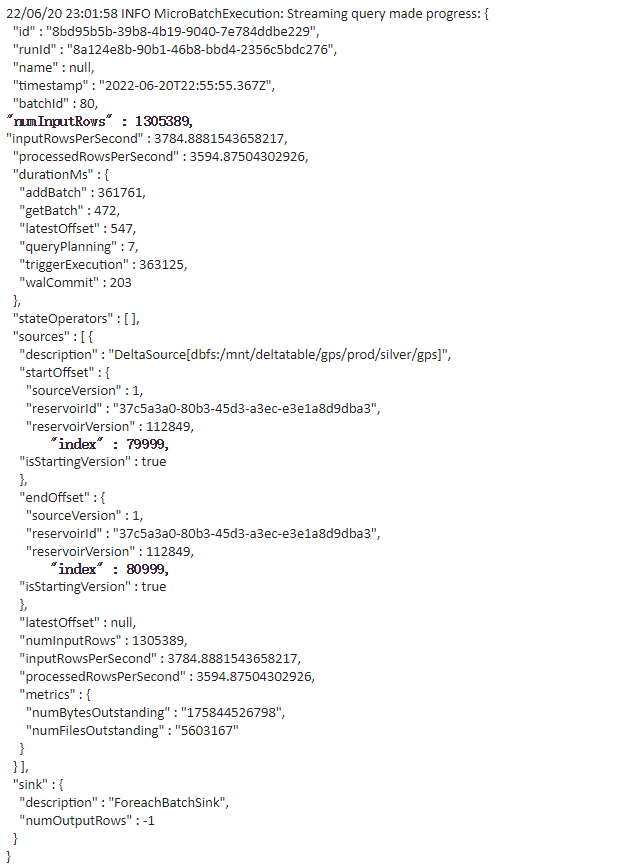
1305389 = numInputRows
avg records per files is 1305389/1000 = 1305.389
After performance drops: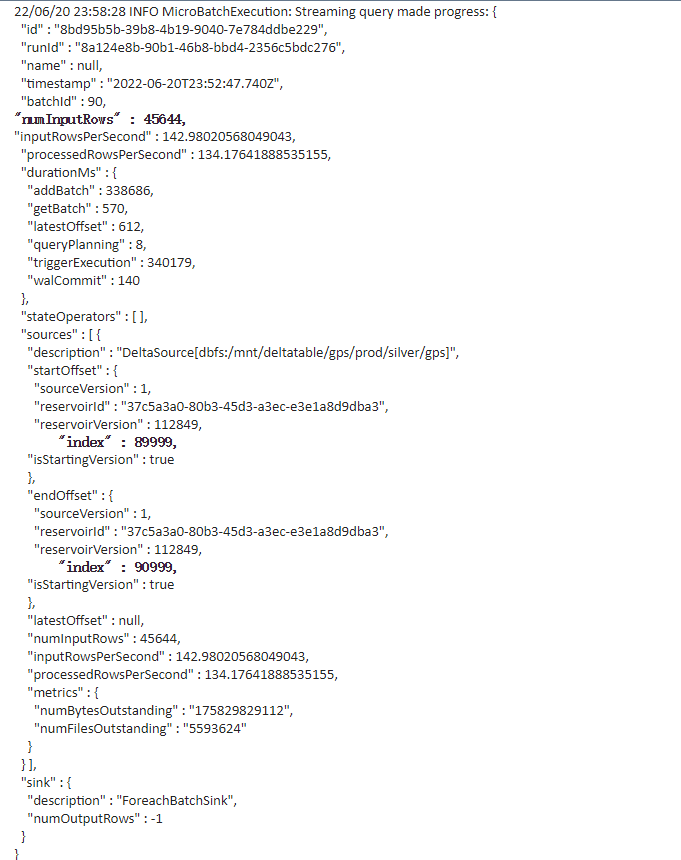
45644= numInputRows
avg records per files is 45644/1000 = 45
From the comparison of (1) and (2), it can be seen that the number of files read by each batch before and after the performance drop (23:30) remains unchanged at 1000, but after 23:30 the number of 1000 total files changes. Less, it is most likely that the file size has become smaller, resulting in a smaller file, so the total number of read items has decreased. That is, for the first day, it processes larger files and then eventually processes smaller files.
Suggestion:
https://docs.microsoft.com/en-gb/azure/databricks/delta/delta-streaming#limit-input-rate
https://docs.microsoft.com/en-us/azure/databricks/delta/optimizations/auto-optimize
Finally, a big thank you to the Databricks team and the Microsoft team for their technical support.