Options
- Mark as New
- Bookmark
- Subscribe
- Mute
- Subscribe to RSS Feed
- Permalink
- Report Inappropriate Content
11-29-2022 12:30 PM
Hi @shamly pt
I took a bit another approach since I guess no one would be sure of the the encoding of the data you showed.
Sample data I took :
‡‡companyId‡‡,‡‡empId‡‡,‡‡regionId‡‡,‡‡companyVersion‡‡,‡‡Question‡‡
‡‡1‡‡,‡‡121212‡‡,‡‡R‡‡,‡‡1.0A‡‡,‡‡NA‡‡
My approach:
First reading that data as is turning off header and sep as ','. Just renamed _c0 to col1 for visual purpose. Then created a split column, separated the values and regex replaced the data. Finally filtered out the row which contained header as I already aliased the dataframe.
dff = spark.read.option("header", "false").option("inferSchema", "true").option("sep",",").csv("/FileStore/tables/Book1.csv").withColumnRenamed("_c0", "col1")

split_col = pyspark.sql.functions.split(dff['col1'], ',')

df2 = dff.select(regexp_replace(split_col.getItem(0), "[^0-9a-zA-Z_\-]+", "").alias('companyId'),\
                 regexp_replace(split_col.getItem(1), "[^0-9a-zA-Z_\-]+", "").alias('empId'), \
                regexp_replace(split_col.getItem(2), "[^0-9a-zA-Z_\-]+", "").alias('regionId'), \
                regexp_replace(split_col.getItem(3), "[^0-9a-zA-Z_\-]+", "").alias('companyVersion'), \
                regexp_replace(split_col.getItem(4), "[^0-9a-zA-Z_\-]+", "").alias('Question')) \

output = df2.where(df2.companyId != 'companyId')
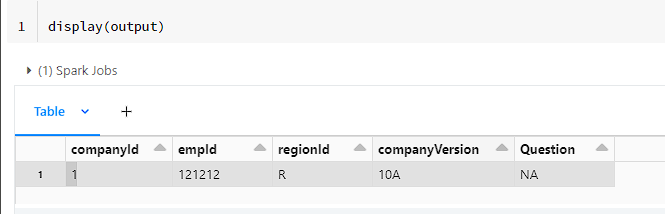
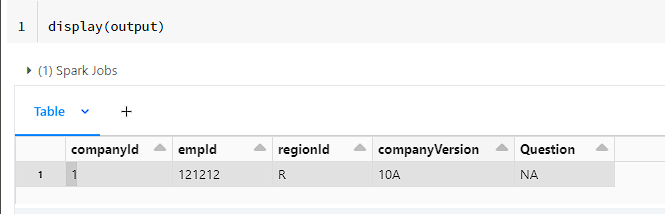
My output:
Uma Mahesh D