- Mark as New
- Bookmark
- Subscribe
- Mute
- Subscribe to RSS Feed
- Permalink
- Report Inappropriate Content
05-12-2022 05:55 AM
Hi everyone, I have connected to Cosmos using this tutorial https://github.com/Azure/azure-sdk-for-java/tree/main/sdk/cosmos/azure-cosmos-spark_3_2-12/Samples/D...
After creating a table using a simple SQL command:
CREATE TABLE mydb.cosmos_table AS
SELECT *
FROM cosmosCatalog.mycosmosdb.mycosmoscontainer
LIMIT 100
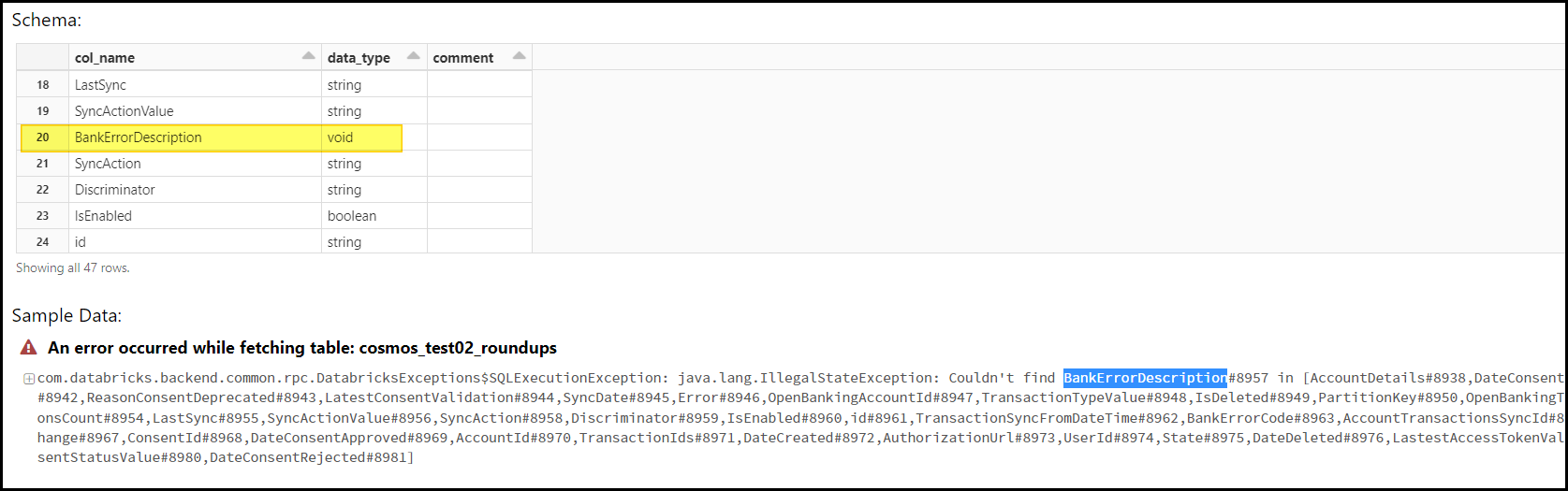
After this statement finishes successfully, when querying or checking the table in the "Data" pane on the left, I receive this error. Apparently, the column "BankErrorDescription" is of type void, and then it can't be found according to the following error.
How to turn this void column into string for example? One approach would be to unload to storage and then load again but I'd prefer a more direct solution?
- Labels:
-
Create table