How to enable/verify cloud fetch from PowerBI

- Mark as New
- Bookmark
- Subscribe
- Mute
- Subscribe to RSS Feed
- Permalink
- Report Inappropriate Content
01-30-2022 08:01 AM
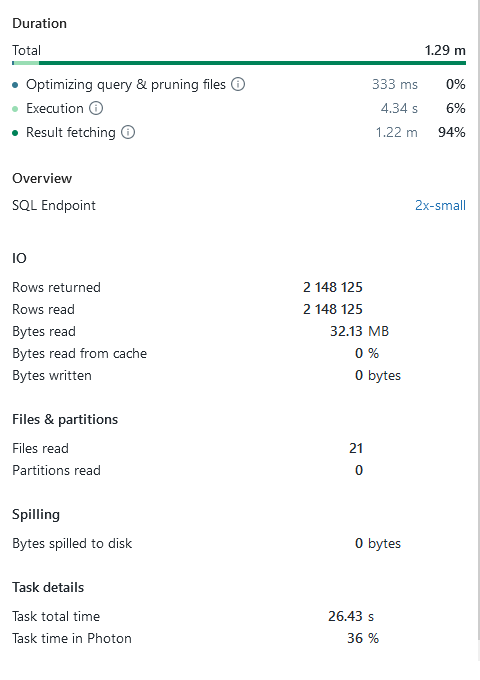
I tried to benchmark the Powerbi Databricks connector vs the powerbi Delta Lake reader on a dataset of 2.15million rows. I found that the delta lake reader used 20 seconds, while importing through the SQL compute endpoint took ~75 seconds.
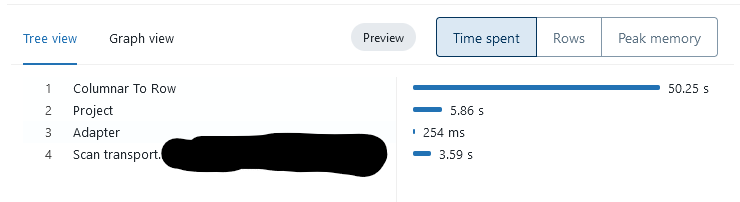
When I look at the query profile in SQL compute I see that 50 seconds are spendt in the "Columnar To Row" step. This makes me rather suspicios, since I got the impression that with an updated PowerBI we would take advantage of "cloud fetch" which creates files containing Apache Arrow batches, which is a columnar format. So why the conversion to rows? Maybe it is not actually using cloud fetch? Is there any way to verify that I am actually using cloud fetch? Either in PowerBi logs or in the Databricks SQL compute endpoint web interface?
- Labels:
-
Cloud
-
Delt Lake
-
Powerbi
-
Powerbi Databricks
-
SQL


