- Mark as New
- Bookmark
- Subscribe
- Mute
- Subscribe to RSS Feed
- Permalink
- Report Inappropriate Content
12-15-2021 11:38 PM
Hi Atul,
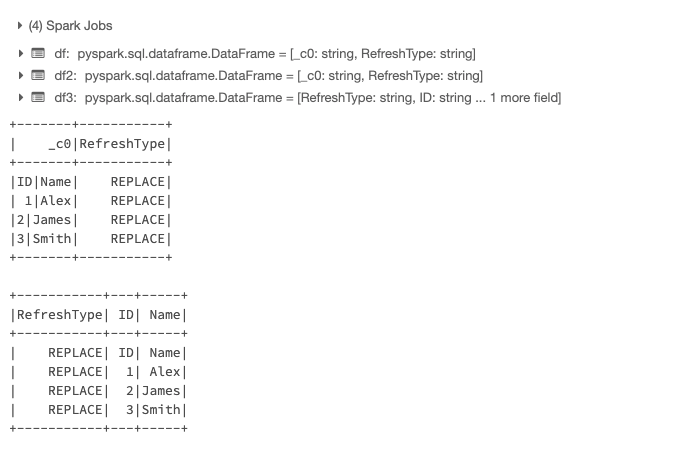
Based on the data which I cooked here is the code base which will read file and generate a dataframe where REFRESH TYPE will be added as a new column and rest of the columns will be split into different columns
*******************************************************************************
# Import Libararies
from pyspark.sql.functions import input_file_name, lit, split, col
# Declare UDF to Sort Records (Later Used To Remove Headers)
def dfZipWithIndex (df, offset=1, colName="rowId"):
'''
Enumerates dataframe rows is native order, like rdd.ZipWithIndex(), but on a dataframe
and preserves a schema
:param df: source dataframe
:param offset: adjustment to zipWithIndex()'s index
:param colName: name of the index column
'''
new_schema = StructType(
[StructField(colName,LongType(),True)] # new added field in front
+ df.schema.fields # previous schema
)
zipped_rdd = df.rdd.zipWithIndex()
new_rdd = zipped_rdd.map(lambda args: ([args[1] + offset] + list(args[0])))
return spark.createDataFrame(new_rdd, new_schema)
# Read Data File
df = sqlContext.read.format('com.databricks.spark.csv').load("/FileStore/test.csv")
# Extract First Row Which is REFRESH TYPE
x = lit(str(df.limit(1).collect()[0][0]))
# Add REFRESH TYPE as a NEW COLUMN
df = df.withColumn("RefreshType",x)
# REMOVE/FILTER REFRESH TYPE FROM DATAFRAME
df2=dfZipWithIndex(df)
df2 = df2.filter(df2.rowId>1).drop("rowId")
df2.show()
#Split UDF
split_col = split(df2._c0, '\\|',)
# Finally split ID & Name column and create a data frame
df3=df2.withColumn("ID",split_col.getItem(0)) \
.withColumn("Name",split_col.getItem(1)) \
.drop(col("_c0"))
df3.show()
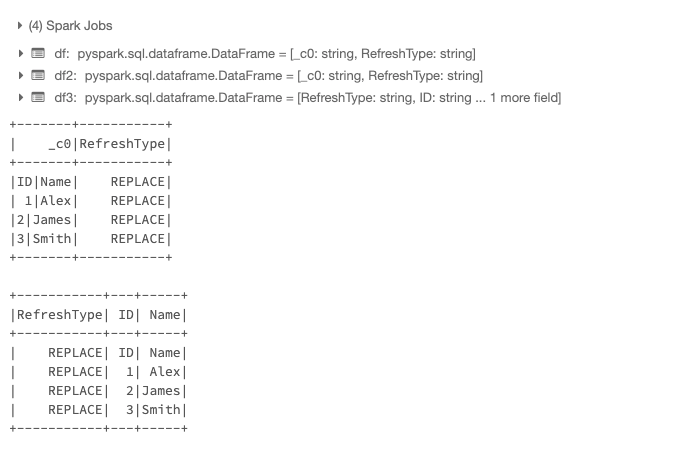
Idea is that finally you can save this dataframe into a temporary table and then it will be easy for you to do IF-ELSE statement. My understanding was that currently as you may be writing complete raw dataset into table its like complete data into a single column (like below)
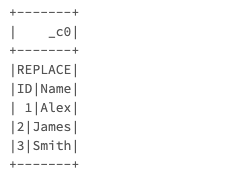
Let me know if we have different understanding.
Gurpreet Singh Sethi
Sr Partner Solution Architect ANZ
+61 0455502323
gurpreet.sethi@databricks.com