Options
- Mark as New
- Bookmark
- Subscribe
- Mute
- Subscribe to RSS Feed
- Permalink
- Report Inappropriate Content
12-21-2021 10:50 PM
Hi SailajaB,
Try this out.
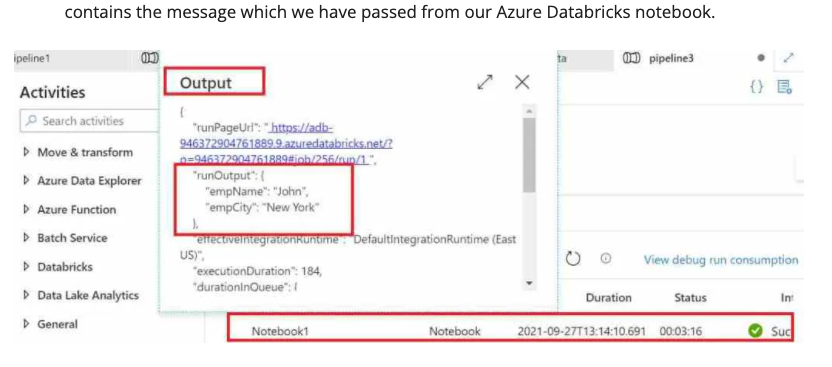
Notebook, once executed successfully return a long JSON formatted output. We need to specify appropriate nodes to fetch the output.
In below screenshot we can see that when notebook ran it returns empName & empCity as output.
- In respective pipeline, add a VARIABLE (to capture output of NOTEBOOK Task)
- Add a SET VARIABLE activity and use VARIABLE defined in above step and add below expression:
@activity(''YOUR NOTEBOOK ACTIVITY NAME').output.runOutput.an_object.name.value
- Add link between NOTEBOOK ACTIVITY and SET VARIABLE ACTIVITY
- Run your pipeline and you should see the output captured in this variable
Note: If you want to specify custom return value then you need to use :
dbutils.notebook.exit('VALUE YOU WANT TO RETURN')
Let me know how it goes.
Cheers
GS
Regards
Gurpreet Singh Sethi
Sr Partner Solution Architect ANZ
+61 0455502323
gurpreet.sethi@databricks.com
Gurpreet Singh Sethi
Sr Partner Solution Architect ANZ
+61 0455502323
gurpreet.sethi@databricks.com