Use Python code from a remote Git repository

Options
- Mark as New
- Bookmark
- Subscribe
- Mute
- Subscribe to RSS Feed
- Permalink
- Report Inappropriate Content
09-21-2023 01:38 PM
I'm trying to create a task where the source is a Python script located in remote GitLab repo. I'm following the instructions HERE and this is how I have the task set up:
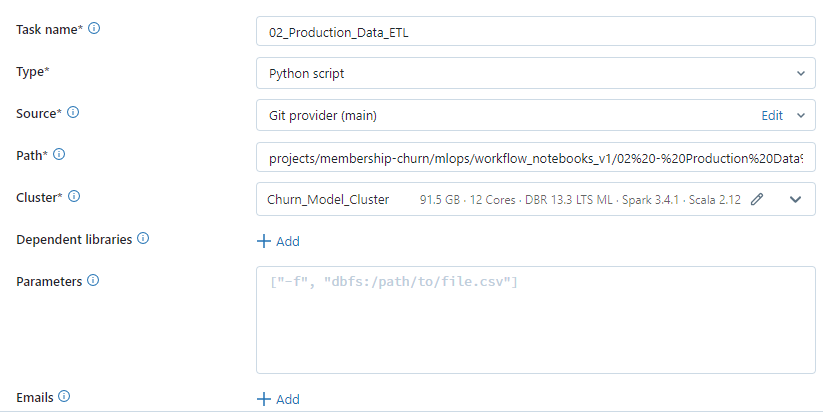
However, no matter what path I specify all I get is the error below:
Cannot read the python file /Repos/.internal/4ac77871e5_commits/36c5bd9261b47a0bad5eaf99f32b9a2cd7032471/projects/membership-churn/mlops/workflow_notebooks_v1/02%20-%20Production%20Data%20ETL.py. Please check driver logs for more detailsI've searched the Community and found THIS and tried to follow the advice mentioned there.
The Logs show the below AssertionError:
23/09/21 19:25:24 WARN JupyterDriverLocal: User code returned error with traceback: [0;31m---------------------------------------------------------------------------[0m
[0;31mAssertionError[0m Traceback (most recent call last)
File [0;32m~/.ipykernel/1132/command--1-426573936:2[0m
[1;32m 1[0m [38;5;28;01mfrom[39;00m [38;5;21;01mos[39;00m[38;5;21;01m.[39;00m[38;5;21;01mpath[39;00m [38;5;28;01mimport[39;00m exists
[0;32m----> 2[0m [38;5;28;01massert[39;00m(exists([38;5;124m"[39m[38;5;124m/Workspace/Repos/.internal/4ac77871e5_commits/36c5bd9261b47a0bad5eaf99f32b9a2cd7032471/projects/membership-churn/mlops/workflow_notebooks_v1/02[39m[38;5;124m%[39m[38;5;124m20-[39m[38;5;124m%[39m[38;5;124m20Production[39m[38;5;124m%[39m[38;5;124m20Data[39m[38;5;132;01m%20E[39;00m[38;5;124mTL.py[39m[38;5;124m"[39m))I'm not quite sure why is it trying to invoke a Jupyter Driver since the files in my repo are all *.py
What am I doing wrong here?
