Delta table and AnalysisException: [PATH_NOT_FOUND] Path does not exist

- Mark as New
- Bookmark
- Subscribe
- Mute
- Subscribe to RSS Feed
- Permalink
- Report Inappropriate Content
11-21-2023 02:15 PM - edited 11-21-2023 02:18 PM
I am performing some tests with delta tables. For each test, I write a delta table to Azure Blob Storage. Then I manually delete the delta table. After deleting the table and running my code again, I get this error:
AnalysisException: [PATH_NOT_FOUND] Path does not exist: /mnt/delta-sharing/temp/df.
Here is a minimal working example to reproduce my problem and the exact order of operations I am performing.
Minimal working example:
Databricks notebook cell 1:
from delta.tables import DeltaTable
Databricks notebook cell 2:
df = spark.createDataFrame(
    [
        (0, 1)
    ],
    ('col_1', 'col_2')
)

path = '/mnt/delta-sharing/temp/df'
Databricks notebook cell 3:
# If delta table does not exist, create it
if not DeltaTable.isDeltaTable(spark, path):
    print('Delta table does not exist. Creating it')
    df.write.format('delta').save(path)
    delta_table = DeltaTable.forPath(spark, path)

# Load existing data in the delta table
delta_table = DeltaTable.forPath(spark, path)
Order of operations:
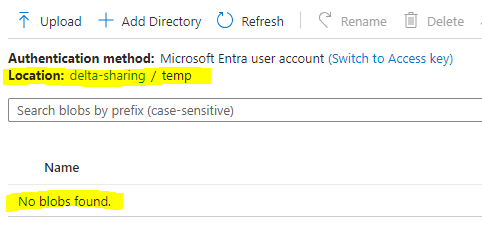
- Step 1: Check in Azure Blob Storage that the path provided in cell 2 is empty:
- Step 2: Run all three cells in the notebook. I get the error:
AnalysisException: [PATH_NOT_FOUND] Path does not exist: /mnt/delta-sharing/temp/df.

- Step 3: Don't do anything else except rerun cell 3. I do not get an error, and the delta table is created successfully:
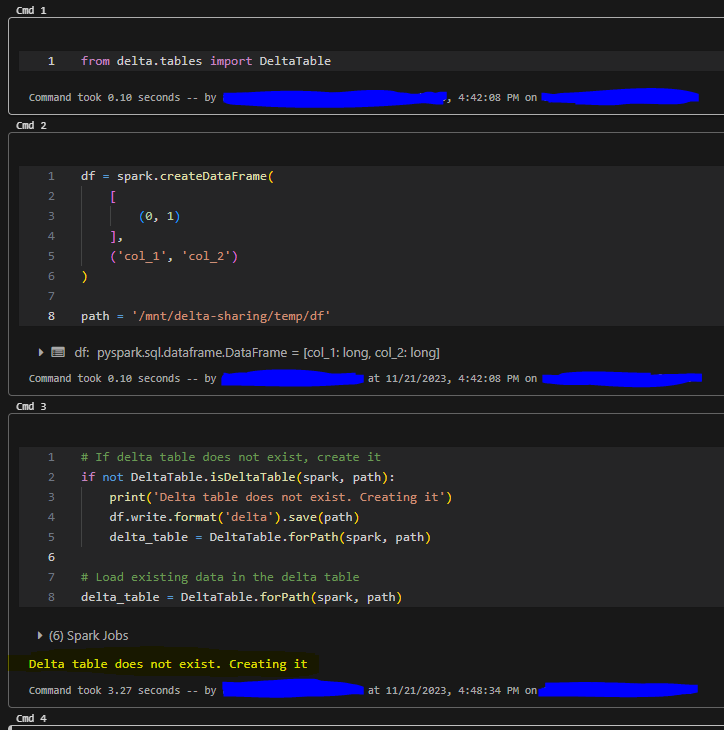

- Step 4: Delete the delta table
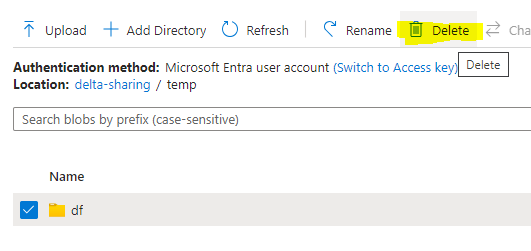
- Step 5: Rerun cell 3. Get the error: "AnalysisException: [PATH_NOT_FOUND] Path does not exist: /mnt/delta-sharing/temp/df."
- Step 6: Rerun cell 3. The delta table is created successfully.
As shown above, every time I delete the delta table, I have to rerun cell 3 twice to successfully enter the if statement
if not DeltaTable.isDeltaTable(spark, path)
I should note that there are some random (at least to me) times when if I restart the cluster or detach and reattach the notebook then the first run of cell 3 works. But then after deleting the delta table I always have to run cell 3 twice for the delta table to be created.
Why is this happening? Is this a problem with delta table or Azure Blob Storage? Is there any solution? Is there a best practice for deleting delta tables that I am violating?
