how to read the CSV file from users workspace

- Mark as New
- Bookmark
- Subscribe
- Mute
- Subscribe to RSS Feed
- Permalink
- Report Inappropriate Content
11-29-2023 03:08 AM
Hi!
I have been carrying out a POC, so I created the CSV file in my workspace and tried to read the content using the techniques below in a Python notebook, but did not work.
Option1:
As an alternative, I uploaded the CSV file into a blob storage account and able to read it without any issues.
I am curious to find as I believe there must be a way to read the CSV file from my work space aswell.
I would be glad if you can post here how to do so?
Thanks!
- Mark as New
- Bookmark
- Subscribe
- Mute
- Subscribe to RSS Feed
- Permalink
- Report Inappropriate Content
11-29-2023 03:55 AM
I tried the below repo_file values in both options. However, I continue to see the same exception

- Mark as New
- Bookmark
- Subscribe
- Mute
- Subscribe to RSS Feed
- Permalink
- Report Inappropriate Content
11-29-2023 08:14 AM
Hi @Dev
you can read like below with the latest cluster 12.2 and above (prefix file:/)

- Mark as New
- Bookmark
- Subscribe
- Mute
- Subscribe to RSS Feed
- Permalink
- Report Inappropriate Content
08-05-2024 03:37 AM
This worked for me thanks, adding file:/ before Workspace

- Mark as New
- Bookmark
- Subscribe
- Mute
- Subscribe to RSS Feed
- Permalink
- Report Inappropriate Content
05-23-2025 09:53 AM
Had the same issue today, adding the "file:/" prefix worked for me too, as @Krishnamatta said:
file:/Workspace/Users/u1@org.com/csv files/f1.csvThanks
- Mark as New
- Bookmark
- Subscribe
- Mute
- Subscribe to RSS Feed
- Permalink
- Report Inappropriate Content
11-29-2023 08:49 AM - edited 11-29-2023 08:53 AM
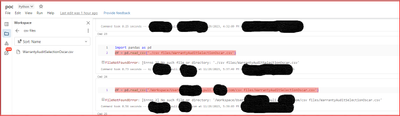
@Retired_mod I copied the file path and used the same, but it didn't help. It has been working fine if I copy the file path from repos but not from the user's workspace area.

- Mark as New
- Bookmark
- Subscribe
- Mute
- Subscribe to RSS Feed
- Permalink
- Report Inappropriate Content
11-30-2024 06:01 AM
for unity catalog enabled clusters, with the default security permmissions, I think we cannot access like this anymore.

- Mark as New
- Bookmark
- Subscribe
- Mute
- Subscribe to RSS Feed
- Permalink
- Report Inappropriate Content
12-02-2024 01:34 AM
Hi @Dev ,
Generally, What happens spark reader APIs point to the DBFS by default. And, to read the file from User workspace, we need to append 'file:/' in the prefix.
Thanks
