
Options
- Mark as New
- Bookmark
- Subscribe
- Mute
- Subscribe to RSS Feed
- Permalink
- Report Inappropriate Content
01-16-2024 10:56 AM
Is there a way to just delete the folder and everything inside?
This is possible in Azure storage but I don't have access directly to the data because the auto-created databricks resource group locks me out even though I am owner and admin of Azure subscription.
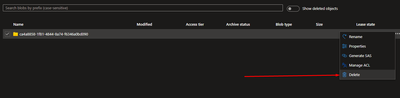
This is how easy it is in Azure Storage where I have access.
Databricks data is stored in Azure storage so there is no reason this should not be possible. If it is not possible in Databricks then how do I gain access to raw data in Azure storage and delete it there? In other words, how do I get around the resource group restrictions as an Azure subscription owner and admin?
