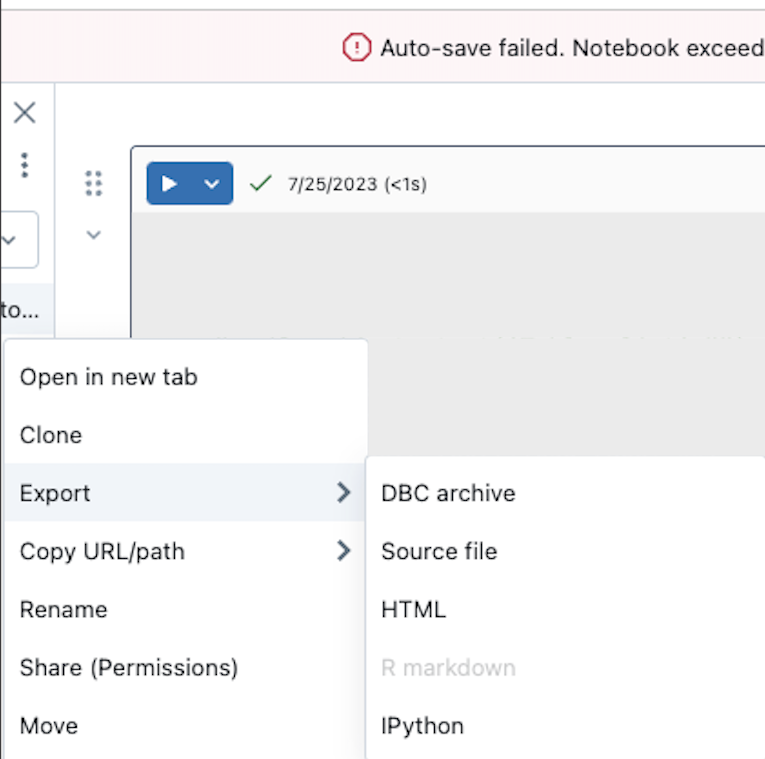
How to export/clone Databricks Notebook without results via web UI?

Options
- Mark as New
- Bookmark
- Subscribe
- Mute
- Subscribe to RSS Feed
- Permalink
- Report Inappropriate Content
05-19-2024 03:07 PM - edited 05-19-2024 03:32 PM
When a Databricks Notebook exceeds size limit, it suggests to `clone/export without results`.
This is exactly what I want to do, but the current web UI does not provide the ability to bypass/skip the results in either the `clone` or `export` context menus. Additional note: I do not want to clear the outputs of the current notebook.
Screenshots provided for visual context. Not sure if there are other places that I may have overlooked.
Fact finding performed so far:
- Reference consulted Export and import Databricks notebooks - Azure Databricks | Microsoft Learn.
Thank you in advance for any insights you can share on achieving this goal.
Labels:
- Labels:
-
Workflows