Running jar on Databricks cluster from Airflow

- Mark as New
- Bookmark
- Subscribe
- Mute
- Subscribe to RSS Feed
- Permalink
- Report Inappropriate Content
07-31-2024 11:06 PM
Hello,
I have a jar file which is installed on a cluster. I need to run this jar from Airflow using DatabricksSubmitRunOperator. I followed the standard instructions as available on Airflow docs
https://airflow.apache.org/docs/apache-airflow-providers-databricks/1.0.0/operators.html
There is a parameter which is passed to the Operator, "libraries" which is supposed to contain the path to jar file. Since the jar file is already installed on the cluster, I don't wish to provide any specific path to jar. I tried few things but everything seems to be failing
1. Did not include libraries parameter - Failed with an error that it is required
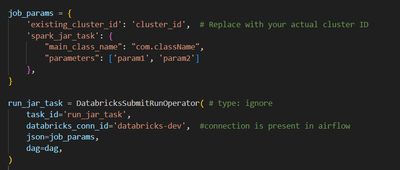
2. Added libraries parameter but kept it empty - Failed with an error that it needs some value

3. Added path to jar file where it is stored - Failed with an error because it tried to install the jar to cluster and the user does not have 'manage' permission to do so

4. Passed 'jar' key but value as empty - Got error "Library installation failed for library due to user error. Error messages:\nJava JARs must be stored in UC Volumes, dbfs, s3, adls, gs or as a workspace file/local file. Make sure the URI begins with 'dbfs:', 'file:', 's3:', 'abfss:', 'gs:', 'wasbs:', '/Volumes', or '/Workspace'but the URI is ''

What should I do so that I can run the jar which is already installed on the cluster? Is there any dummy value I can use instead of mentioning jar file path?
Again, the actual jar which I want to use is already installed on the cluster and do not actually want to install anything else. I have ran the main class of this jar file from notebook and it ran fine
