
- Mark as New
- Bookmark
- Subscribe
- Mute
- Subscribe to RSS Feed
- Permalink
- Report Inappropriate Content
08-15-2024 12:28 AM
Hi,
You would still connect using OAuth tokens. It is just that Databricks recommends using personal access tokens belonging to service principals instead of workspace users. To create tokens for service principals, see Manage tokens for a service principal. But your personal access token should work just fine as long as it hasn't expired and you have access to SQL Warehouse.
To make sure you are setting up a fresh connection ensure you revoke all existing access by doing the following.
1. Go to Manage your Google Account > Security > Your connections to third-party apps & services > Databricks Connector for Data Studio. And revoke all access and delete the connection if needed.

2. Revoke access in Looker
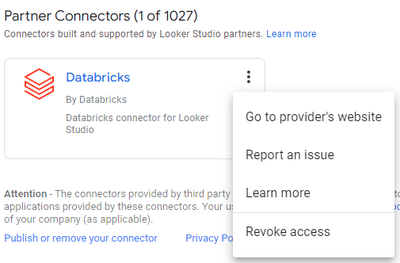
Now setup a new connection by authorizing the connector

Then when you are prompted to enter the Databricks credentials enter 'token' as the Username and the personal access token in the Password field.

