No cluster create capabilities on my databricks UI, just SQL Warehouse. Complete work stoppage.

- Mark as New
- Bookmark
- Subscribe
- Mute
- Subscribe to RSS Feed
- Permalink
- Report Inappropriate Content
06-25-2025 09:52 AM

- Mark as New
- Bookmark
- Subscribe
- Mute
- Subscribe to RSS Feed
- Permalink
- Report Inappropriate Content
06-25-2025 10:44 AM
Possible Reasons
🏢 SQL-Only Workspace: Your workspace may be provisioned for Databricks SQL only — no support for notebooks or clusters.
🔒 Permission Restriction: You might not have cluster create or use permissions.
👤 Wrong Persona Selected: UI might be set to SQL persona only (limited view).
Steps to Resolve
Check Workspace Type:
Ask your admin: Check with admin for credential access from Databricks Account console
Switch Persona (if option available):
Top-left menu → Change from SQL to Data Science & Engineering
Verify Permissions:
Ask admin to check if you have:
Can Manage Clusters
Can Use Clusters
Request Full Access:
If workspace is SQL-only and you need notebooks/Spark, request a full "Data Science & Engineering" workspace.

- Mark as New
- Bookmark
- Subscribe
- Mute
- Subscribe to RSS Feed
- Permalink
- Report Inappropriate Content
06-26-2025 08:35 AM
@cloudengineer By default workspace admins can create interactive clusters. Non-admin users should be granted access either to a compute policy or should be provisioned access onto a existing clusters.
If there is a requirement to enable cluster creation either a personal compute or interactive clusters with a specific policy, either of the below options should be enabled by an admin user.
1. Enable Personal Compute by an account admin under databricks account console settings as below.
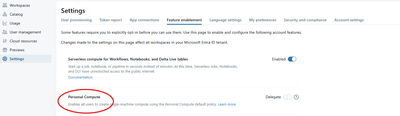
2. Another workaround is to enable Allow unrestricted cluster creation either to a group or individual by the Account/workspace admin user.

