
Options
- Mark as New
- Bookmark
- Subscribe
- Mute
- Subscribe to RSS Feed
- Permalink
- Report Inappropriate Content
06-26-2025 08:35 AM
@cloudengineer By default workspace admins can create interactive clusters. Non-admin users should be granted access either to a compute policy or should be provisioned access onto a existing clusters.
If there is a requirement to enable cluster creation either a personal compute or interactive clusters with a specific policy, either of the below options should be enabled by an admin user.
1. Enable Personal Compute by an account admin under databricks account console settings as below.
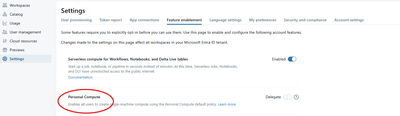
2. Another workaround is to enable Allow unrestricted cluster creation either to a group or individual by the Account/workspace admin user.

