
- Mark as New
- Bookmark
- Subscribe
- Mute
- Subscribe to RSS Feed
- Permalink
- Report Inappropriate Content
09-10-2025 07:10 AM
My Job Compute had trouble on starting the cluster, acusing "Unexpected failure while waiting for the cluster (xxxx) to be ready: Cluster 'xxxx' is unhealthy"
After multiple retries, a new error message appeared:
"Operation could not be completed as it results in exceeding approved [...] Current Limit: 50, Current Usage: 49, Additional Required: 8, (Minimum) New Limit Required: 57"
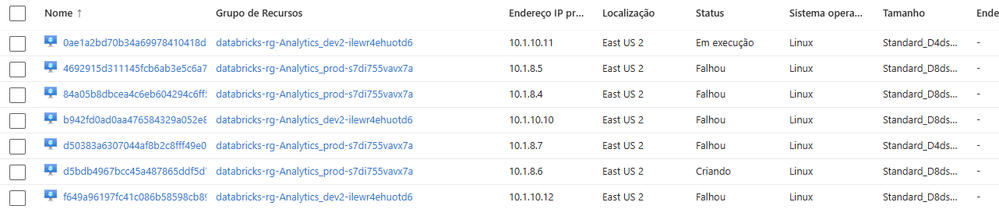
That meant I had 49 vCPUs being used, which is way over what it should be. When opened the Virtual Machines for that Resource Group, I have multiple VMs on "Failed" status.
The current problem is:
- There is no command on Databricks UI to delete those computes
- Azure simply doesn't allow me to delete is because of "System deny assignement created by Azure Databricks"
How to proceed on this scenario?
- Labels:
-
Workflows

- Mark as New
- Bookmark
- Subscribe
- Mute
- Subscribe to RSS Feed
- Permalink
- Report Inappropriate Content
09-10-2025 08:03 AM
@cchiaramelli I faced the similar issue sometime back. Since the VMs are created in Databricks Managed resource group you will not be able to delete the VMs created for compute. The best option would be to open an Azure sup[port ticket they can delete the VMs from backend you just have to provide the consent in email to delete. Open an Azure support ticket.
- Mark as New
- Bookmark
- Subscribe
- Mute
- Subscribe to RSS Feed
- Permalink
- Report Inappropriate Content
09-10-2025 10:33 AM
Thanks for the help! It happened to be fixed "by itself"
- Mark as New
- Bookmark
- Subscribe
- Mute
- Subscribe to RSS Feed
- Permalink
- Report Inappropriate Content
09-10-2025 10:33 AM
UPDATE: Before opening the Support Ticket, the machines suddently disappeared. I deleted the Jobs definitions with its JobClusters definitions, and maybe that solved it, or after some hours the machines were cleaned. Not sure what cleaned it.
Also I noticed that machines of type "v5" (i.e. D8ds_v5) keep failing to start. I changed all jobs to use "v4" machines and everything got back to normal.
