
- Mark as New
- Bookmark
- Subscribe
- Mute
- Subscribe to RSS Feed
- Permalink
- Report Inappropriate Content
09-10-2025 07:10 AM
My Job Compute had trouble on starting the cluster, acusing "Unexpected failure while waiting for the cluster (xxxx) to be ready: Cluster 'xxxx' is unhealthy"
After multiple retries, a new error message appeared:
"Operation could not be completed as it results in exceeding approved [...] Current Limit: 50, Current Usage: 49, Additional Required: 8, (Minimum) New Limit Required: 57"
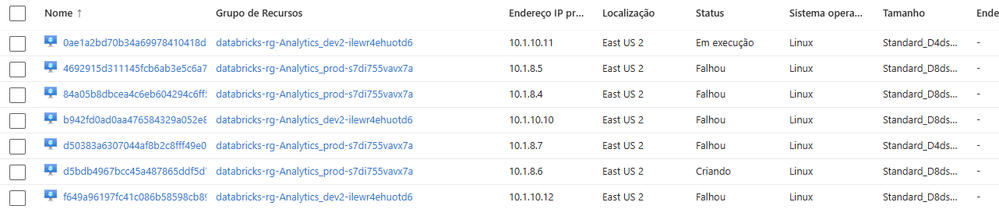
That meant I had 49 vCPUs being used, which is way over what it should be. When opened the Virtual Machines for that Resource Group, I have multiple VMs on "Failed" status.
The current problem is:
- There is no command on Databricks UI to delete those computes
- Azure simply doesn't allow me to delete is because of "System deny assignement created by Azure Databricks"
How to proceed on this scenario?
- Labels:
-
Workflows
