
- Mark as New
- Bookmark
- Subscribe
- Mute
- Subscribe to RSS Feed
- Permalink
- Report Inappropriate Content
09-17-2025 09:00 AM
Thanks for additional details. Could you also tell us if you're using Hive metastore or Unity Catalog?
If you are using Hive then how you have configured storage?
Also, do you see something useful in driver logs?

- Mark as New
- Bookmark
- Subscribe
- Mute
- Subscribe to RSS Feed
- Permalink
- Report Inappropriate Content
09-17-2025 09:10 AM
Hi @szymon_dybczak at the moment, I'm using Databricks Community Edition, however I get the same issue when I'm using a premium edition of Databricks

- Mark as New
- Bookmark
- Subscribe
- Mute
- Subscribe to RSS Feed
- Permalink
- Report Inappropriate Content
09-17-2025 09:45 AM
Any more thoughts on this issue guys
- Mark as New
- Bookmark
- Subscribe
- Mute
- Subscribe to RSS Feed
- Permalink
- Report Inappropriate Content
09-17-2025 10:50 AM
So, since you're using databricks community edition I'm assuming that you're dealing with Hive metastore.
You can try following:
1. Go to Settings
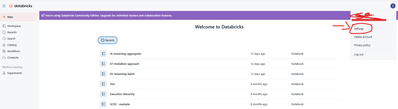
2. Now go to Advance (2) and turn on DBFS File Browser (3)
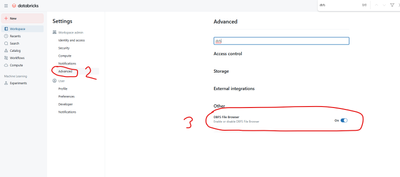
3. Now, click Catalog (4), then DBFS(5) and go to users -> hive -> warehouse and check if you can find the table that you want to delete (Country).
4. If the table is there, copy path to the table (just like I did for flattened_source table in screen below)
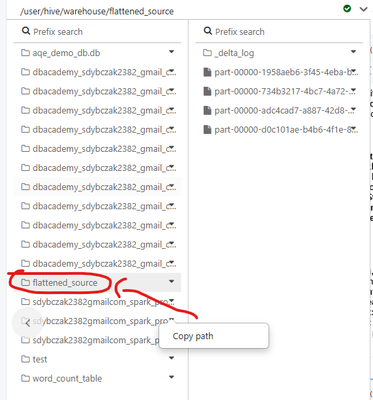
5. Then remove all files using dbutils.fm.rm
dbutils.fs.rm(dir="dbfs:/user/hive/warehouse/invoices_bz", recurse=True)6. Double check that there are no files in your ADLS related to Country table
7. Try to recreate it.
- Mark as New
- Bookmark
- Subscribe
- Mute
- Subscribe to RSS Feed
- Permalink
- Report Inappropriate Content
09-17-2025 11:01 AM - edited 09-17-2025 11:03 AM
Hi @szymon_dybczak , you must have a special version of Databricks Community Edition as I don't have those options after I select settings

Shall I try from my premium paid for version of Databricks?
