Options
- Mark as New
- Bookmark
- Subscribe
- Mute
- Subscribe to RSS Feed
- Permalink
- Report Inappropriate Content
04-01-2026 12:16 PM
Hi @lingareddy_Alva ,
Thank you for your response.
Just to inform you that
1. I am using Databrick's free edition to execute code using Serverless which doesnt allow me to get the partition numbers.
2. I intentionaly did not want to use/specify schema to know the schema inference behaviour.
3. As mention in your reply,
Option 2 — Use cloudFiles.inferColumnTypes
I have configured this property too but no good.
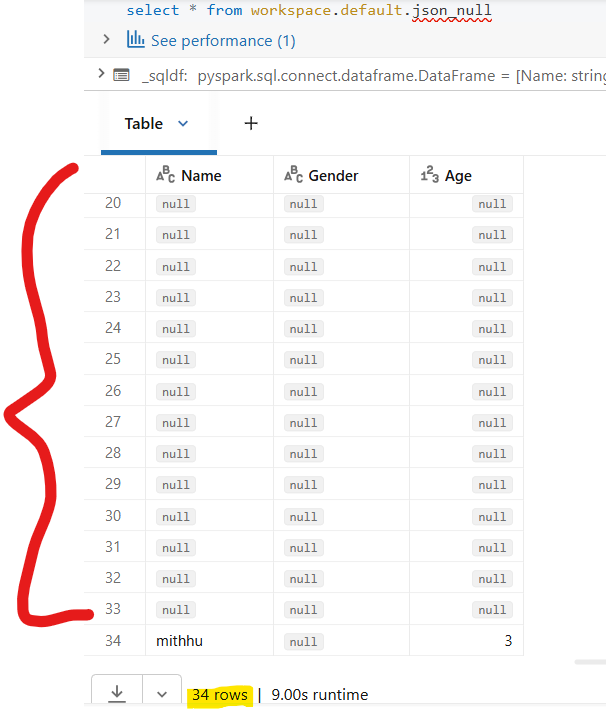
4.I did try option 1 but looks like it still creates 33 partitions.
My code :
from pyspark.sql.types import StructType, StructField, StringType, IntegerType
schema = StructType([
StructField("Name", StringType()),
StructField("Gender", StringType()),
StructField("Age", IntegerType())
])
df = spark.readStream.\
format("cloudFiles")\
.option("cloudFiles.format", "json")\
.option("cloudFiles.schemaLocation", "/Volumes/workspace/default/sys/schema5")\
.schema(schema)\
.load('/Volumes/workspace/dev/input/')\
.writeStream\
.format("delta")\
.option("checkpointLocation", "/Volumes/workspace/default/sys/checkpoint5")\
.option("mergeSchema", "true")\
.trigger(availableNow=True)\
.toTable("workspace.default.json_null")
Table Output : Attached
I don't find google answers helpful too.