
Options
- Mark as New
- Bookmark
- Subscribe
- Mute
- Subscribe to RSS Feed
- Permalink
- Report Inappropriate Content
04-28-2026 09:02 PM - edited 04-28-2026 09:03 PM
I've a table with the following profiling settings
{
  "status": "MONITOR_STATUS_ACTIVE",
  "profile_metrics_table_name": "edw_prd_aen.silver.fct_retail_permit_profile_metrics",
  "drift_metrics_table_name": "edw_prd_aen.silver.fct_retail_permit_drift_metrics",
  "dashboard_id": "01f0ae86bd4c1fc6b95db17d44a13cf6",
  "schedule": {
    "quartz_cron_expression": "51 0 12 * * ?",
    "timezone_id": "Asia/Dubai"
  },
  "assets_dir": "...",
  "output_schema_name": "edw_prd_aen.silver",
  "table_name": "edw_prd_aen.silver.fct_retail_permit",
  "notifications": {
    "on_failure": {
      "email_addresses": [
        "..."
      ]
    }
  },
  "time_series": {
    "granularities": [
      "1 week"
    ],
    "timestamp_col": "_ingest_date"
  },
  "monitor_version": "0",
  "custom_metrics": [],
  "slicing_exprs": []
}
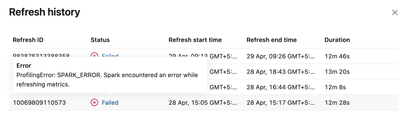
I added a new column to the table and the refresh has started failing with the following error.
ProfilingError: SPARK_ERROR. Spark encountered an error while refreshing metrics.

Options
- Mark as New
- Bookmark
- Subscribe
- Mute
- Subscribe to RSS Feed
- Permalink
- Report Inappropriate Content
04-29-2026 03:03 PM
Hi @Dhruv-22 ,
This is a known limitation. Data Profiling monitors don't auto-adapt when columns are added to the source table, the fix is to delete and recreate the monitor.
When the monitor is created, the profiling job captures the source schema and builds its execution plan around it. Adding a column causes a mismatch at refresh time
