I've a table with the following profiling settings
{
  "status": "MONITOR_STATUS_ACTIVE",
  "profile_metrics_table_name": "edw_prd_aen.silver.fct_retail_permit_profile_metrics",
  "drift_metrics_table_name": "edw_prd_aen.silver.fct_retail_permit_drift_metrics",
  "dashboard_id": "01f0ae86bd4c1fc6b95db17d44a13cf6",
  "schedule": {
    "quartz_cron_expression": "51 0 12 * * ?",
    "timezone_id": "Asia/Dubai"
  },
  "assets_dir": "...",
  "output_schema_name": "edw_prd_aen.silver",
  "table_name": "edw_prd_aen.silver.fct_retail_permit",
  "notifications": {
    "on_failure": {
      "email_addresses": [
        "..."
      ]
    }
  },
  "time_series": {
    "granularities": [
      "1 week"
    ],
    "timestamp_col": "_ingest_date"
  },
  "monitor_version": "0",
  "custom_metrics": [],
  "slicing_exprs": []
}
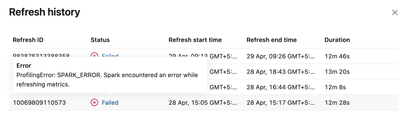
I added a new column to the table and the refresh has started failing with the following error.
ProfilingError: SPARK_ERROR. Spark encountered an error while refreshing metrics.