ModuleNotFoundError / SerializationError when executing over databricks-connect

- Mark as New
- Bookmark
- Subscribe
- Mute
- Subscribe to RSS Feed
- Permalink
- Report Inappropriate Content
09-27-2021 01:36 PM
I am running into the following error when I run a model fitting process over databricks-connect.
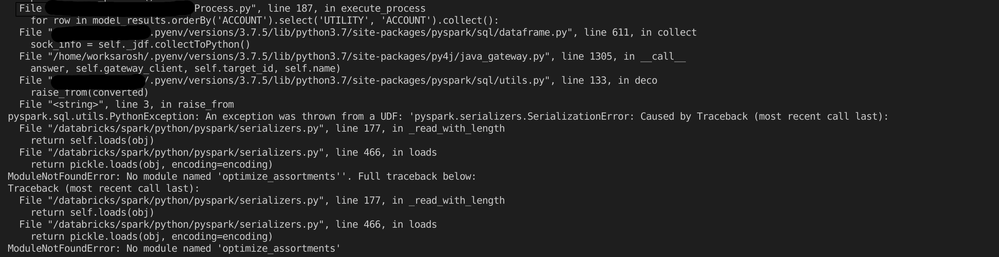
Note that the program runs successfully up to this point; no module not found errors are raised in the beginning and spark actions run just fine until this collect statement is called. Also, I have packaged my project as a wheel and installed it directly on the cluster to ensure the module is available to workers.
I have the python project set up as follows:
optimize-assortments
| - configs/
| - tests/
| -optimize_assortments/
| - process.py
| - sub_process_1.py
| - sub_process_2.py
| - sub_process_3.py
process.py imports classes from each sub_process in module_1, instantiates and runs their methods. They are a collection of spark transformations along with a Pandas UDF, which fits a sci-kit model distributed across worker nodes. The error is raised after some subprocesses execute spark commands successfully across workers.
Some things I've tried/verified:
- Python/DBR/ db-connect versions.
- Moving all code from the sub_module into the parent Process.
- Building a wheel and installing it on my cluster:
- Running via databricks-connect gives me ModuleNotFoundError halfway through execution as described above.
- If I import the module/submodule from in a Databricks notebook, the code executes successfully.

