- Mark as New
- Bookmark
- Subscribe
- Mute
- Subscribe to RSS Feed
- Permalink
- Report Inappropriate Content
10-05-2021 05:24 PM
Hi Martin,
Sorry for the delayed response. Regarding the VPC peering connection, please check if the following is configured correctly:
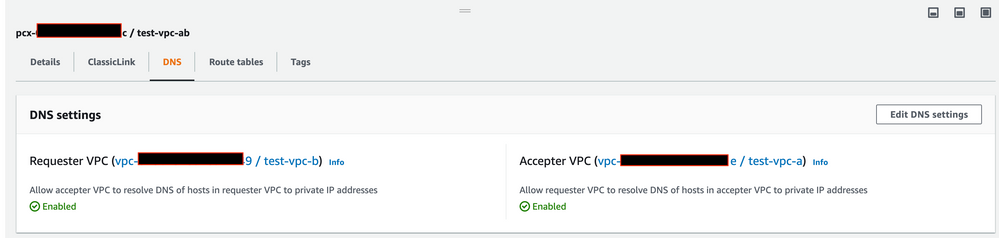
1. On VPC management console, go to Peering Connections -> select the connection in question -> DNS, and make sure both "Allow accepter VPC to resolve DNS of hosts in requester VPC to private IP addresses" and "Allow requester VPC to resolve DNS of hosts in accepter VPC to private IP addresses" are enabled:
2. Under "Route tables" tab of VPC connection for both requester VPC and accepter VPC, please make sure it is associated with the correct route table. For example, for the requester (Databricks) VPC, make sure it is associated with Databricks workspace route table; for the accepter (your data source, say RDS) VPC, make sure it is associated with your data source route table.
Please give it a try and let us know if you are still experiencing any issues, and we will be happy to assist you further.
Thanks,
Huaming