How to "Python versions in the Spark Connect client and server are different. " in UDF

- Mark as New
- Bookmark
- Subscribe
- Mute
- Subscribe to RSS Feed
- Permalink
- Report Inappropriate Content
06-08-2025 07:20 PM
I've read all relevant articles but none have solution that I could understand. Sorry I'm new to it.
I have a simple UDF to demonstrate the problem:
df = spark.createDataFrame([(1, 1.0, 'a'), (1, 2.0, 'b'), (2, 3.0, 'c'), (2, 5.0, 'd'), (2, 10.0, 'e')], ("id", "v", 'l'))

def subtract_mean(pdf: pd.DataFrame) -> pd.DataFrame:
l = pdf.to_dict(orient='records')
for rec in l: rec["result"] = {"timestamp": datetime.now}
return pd.DataFrame(l)

print(df.schema)

result_field_schema = StructType([
StructField("timestamp", DateType())
])

out_schema = StructType([x for x in df.schema.fields]).add(StructField('result', result_field_schema, True))

df.groupby("id").applyInPandas(subtract_mean, schema=out_schema).show()
It will throw exception
"Python versions in the Spark Connect client and server are different. "
2136 "To execute user-defined functions, client and server should have the "
(...)
This is happening in a brand new notebook with no YAML attached. I could not find how to set python version in YAML either.
I found that VS code commits this to the notebook (this is why I tried new one in the test), and this change also didn't change anything.
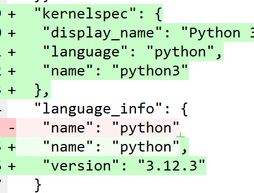
Version of the python in the notebook is nailed to 3.11
import sys
print("Python version:", sys.version)
# Python version: 3.11.10 (main, Sep 7 2024, 18:35:41) [GCC 11.4.0]
My understanding is that developers of Databricks can't release "serverless" with non-functional mis-versioning, so there has to be way around this.
Please advise how to get it working - i.e. running notebook on serverless with python code in UDF.
Note that my sample is to POC, in real there is a whole API call thing in there that I want to scale up.
Second note that I can run it in "personal compute". But I want to use serverless whereas possible as I don't have much workload for keeping a costly cluster and managing it. I have strict budgets.
Please help.

- Mark as New
- Bookmark
- Subscribe
- Mute
- Subscribe to RSS Feed
- Permalink
- Report Inappropriate Content
06-10-2025 08:37 AM
Hi @Dimitry ,
The error you're seeing indicates that the Python version in your notebook (3.11) doesn't match the version used by Databricks Serverless, which is typically Python 3.12. Since Serverless environments use a fixed Python version, this mismatch can cause issues, and unfortunately, the server-side version can't be changed manually.
To fix this, you can try updating your notebook's environment to one that supports Python 3.12. Here's how:
- Open the Environment side panel in your serverless notebook.
- Look for and select a serverless environment version that includes Python 3.12, if available in your workspace.
- Mark as New
- Bookmark
- Subscribe
- Mute
- Subscribe to RSS Feed
- Permalink
- Report Inappropriate Content
06-10-2025 04:43 PM
Hi mate
Whilst I understand what you are saying, I can't see how it can possibly work.
I get only 2 choices for the serverless environment version:

and version 2 being the latest is python 3.11
Serverless environment version 2 - Azure Databricks | Microsoft Learn

So there is no version to select for 3.12
Unless you are a bot (hard to tell these days), please explain how to do
- Look for and select a serverless environment version that includes Python 3.12, if available in your workspace.
