Attempting to load a JSON file fails due to schema issue (Free Edition)

- Mark as New
- Bookmark
- Subscribe
- Mute
- Subscribe to RSS Feed
- Permalink
- Report Inappropriate Content
01-07-2026 05:28 AM
Hello,
I created a Volume named 'test_volume' under catalog:workspace and schema:default.
Then I uploaded a file named user_0.json into test_volume (fake data, of course):

Now I want to load that file into a data frame.
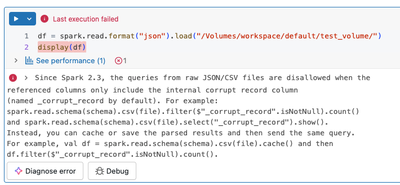
With Python in a notebook:
With SQL:
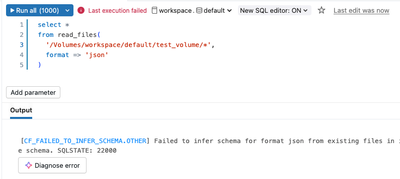
Apparently there is a problem with the schema. But how is that possible given how primitive the JSON object is?
What am I doing wrong here?
Thanks
- Labels:
-
Free Edition
-
JSON Object
- Mark as New
- Bookmark
- Subscribe
- Mute
- Subscribe to RSS Feed
- Permalink
- Report Inappropriate Content
01-07-2026 05:33 AM
The JSON file I uploaded contained the JSON object pretty printed (multiple lines and spaces for indentation). After removing those (single line), it works.

- Mark as New
- Bookmark
- Subscribe
- Mute
- Subscribe to RSS Feed
- Permalink
- Report Inappropriate Content
01-07-2026 07:00 AM
@chris84 Could try using spark.read .option("multiline", "true").json("volume_path") in pyspark

- Mark as New
- Bookmark
- Subscribe
- Mute
- Subscribe to RSS Feed
- Permalink
- Report Inappropriate Content
03-08-2026 05:53 PM
Hi @chris84,
You already identified the root cause: the JSON file was pretty-printed across multiple lines. By default, Spark's JSON reader expects one JSON record per line (sometimes called "JSON Lines" or NDJSON format). When it encounters a pretty-printed file where a single JSON object spans multiple lines, it tries to parse each line independently, which causes a schema/parsing error.
Rather than reformatting your file to a single line, you can tell Spark to treat the entire file as one JSON record by using the multiline option.
PYTHON (PYSPARK)
df = spark.read.option("multiline", "true").json("/Volumes/workspace/default/test_volume/user_0.json")
df.show()
SQL (USING read_files)
SELECT * FROM read_files(
  '/Volumes/workspace/default/test_volume/user_0.json',
  format => 'json',
  multiLine => true
)
SQL (USING A TEMPORARY VIEW)
CREATE TEMPORARY VIEW user_data
USING json
OPTIONS (
  path '/Volumes/workspace/default/test_volume/user_0.json',
  multiline 'true'
);

SELECT * FROM user_data;
WHY THIS HAPPENS
Spark's default behavior (multiline = false) assumes each line in the file is a complete, self-contained JSON record. This is optimized for parallel reads of large files. When a single JSON object is formatted with line breaks and indentation (pretty-printed), each line is not valid JSON on its own, so parsing fails.
Setting multiline to true tells Spark to read the entire file as one entity and parse it as a whole, which handles pretty-printed JSON correctly.
DOCUMENTATION REFERENCES
- JSON file format documentation: https://docs.databricks.com/aws/en/query/formats/json
- read_files SQL function: https://docs.databricks.com/aws/en/sql/language-manual/functions/read_files.html
* This reply used an agent system I built to research and draft this response based on the wide set of documentation I have available and previous memory. I personally review the draft for any obvious issues and for monitoring system reliability and update it when I detect any drift, but there is still a small chance that something is inaccurate, especially if you are experimenting with brand new features.
If this answer resolves your question, could you mark it as "Accept as Solution"? That helps other users quickly find the correct fix.

- Mark as New
- Bookmark
- Subscribe
- Mute
- Subscribe to RSS Feed
- Permalink
- Report Inappropriate Content
03-09-2026 04:50 AM
The AnalysisException you're seeing in the Databricks Community Edition is almost always caused by a mismatch between the JSON file format and Spark’s default reader.
By default, Spark expects JSON Lines (one JSON object per line). If your file is a standard 'pretty-printed' JSON array, the reader will fail. You can fix this immediately by adding the multiLine option to your read command:
# Fix for multiline JSON files
df = spark.read.option("multiLine", "true").json("dbfs:/FileStore/your_file.json")
Also, as a best practice to avoid schema inference errors entirely, I’d recommend defining an explicit StructType schema rather than using inferSchema. If you’re building more extensive workflows, you might find it useful to look into strategies for building autonomous data pipelines that can automatically handle these kinds of schema validations and structural shifts.
