Azure Databricks User Alerts: query_result_table

- Mark as New
- Bookmark
- Subscribe
- Mute
- Subscribe to RSS Feed
- Permalink
- Report Inappropriate Content
10-12-2023 01:50 AM
Hi,
How can I set up the notification email to show all of rows from query_result_table, not only first 10?
- Mark as New
- Bookmark
- Subscribe
- Mute
- Subscribe to RSS Feed
- Permalink
- Report Inappropriate Content
10-16-2023 04:05 AM
Thank you for your reply, but it is not exactly what I thought. I use SQL alerts so dont know where should I go to put this changes written by you.
Workspace > user settings:

I check
- Mark as New
- Bookmark
- Subscribe
- Mute
- Subscribe to RSS Feed
- Permalink
- Report Inappropriate Content
11-03-2023 04:26 AM
Can you help me with my problem? I have a workspace admin but I cannot find the path as you wrote. When I go to the Account Settings > Notifications I can only see:

- Mark as New
- Bookmark
- Subscribe
- Mute
- Subscribe to RSS Feed
- Permalink
- Report Inappropriate Content
10-17-2023 04:04 AM
I see that my previous message has been cut.
So, I just wanted to check where can I change email setting using the code above, because when I open User > Account Settings > Notifications I can see only option like this:
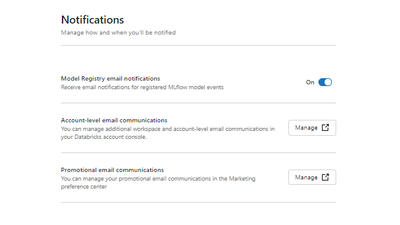
there is no place to configuration emails.
regards,
Meggie
