How to schedule/refresh databricks alerts using REST API?

- Mark as New
- Bookmark
- Subscribe
- Mute
- Subscribe to RSS Feed
- Permalink
- Report Inappropriate Content
10-17-2023 06:54 AM - edited 10-17-2023 07:00 AM
Hi, I am deploying Databricks SQL alerts using REST API. But I can't seem to figure out how to schedule their refresh task.
I went through the documentation it says "Alerts can be scheduled using the sql_task type of the Jobs API, e.g. Jobs/Create"
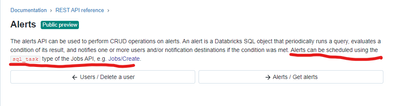
However, in the sql_task of the jobs API, there is no example of scheduling sql_task (query or alert). Having said that, I also tried to schedule using the "Schedule" key of job api eg
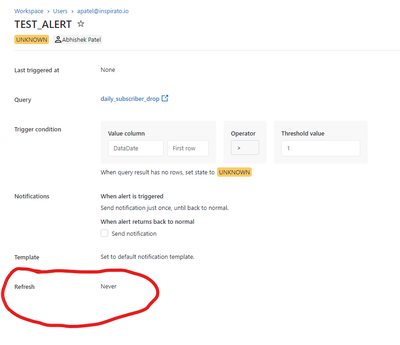
Could you please help me by giving a working example of scheduling a refresh for an alert payload, so alert schedule appears in the below screen? Thank you very much

- Mark as New
- Bookmark
- Subscribe
- Mute
- Subscribe to RSS Feed
- Permalink
- Report Inappropriate Content
10-17-2023 12:36 PM
What they mention in the API docs is that you can create a job with sql_task of type Alert. To make it easier you can try creating the job first in the UI first and downloading the JSON config. Here is an example with the main parameters that should work for what you are trying to do:
{
    "job_id": 1111,
    ...
    "settings": {
        "name": "test_sql_task",
        ...
        "schedule": {
            "quartz_cron_expression": "34 30 20 * * ?",
            "timezone_id": "UTC",
            "pause_status": "UNPAUSED"
        },
        "tasks": [
            {
                "task_key": "test_sql_task",
                "run_if": "ALL_SUCCESS",
                "sql_task": {
                    "alert": {
                        "alert_id": "009f4ff1-0493-4e58-9224-7ea4dcca0f99",
                        "subscriptions": [
                            {
                                "user_name": "test@email.com"
                            }
                        ]
                    },
                    "warehouse_id": "475b94ddc7cd5211"
                }
            }
        ],
        ...
    }
}
