
- Mark as New
- Bookmark
- Subscribe
- Mute
- Subscribe to RSS Feed
- Permalink
- Report Inappropriate Content
01-31-2024 03:29 PM
Hi I didn't see any conversations regarding using python RPA package on Data bricks clusters. Is anyone doing this or have gotten it to successfully work on the clusters?
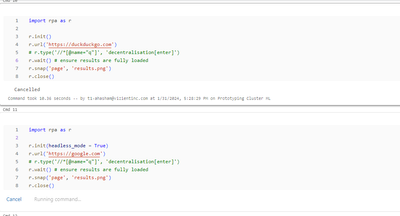
I ran into the following errors:
1) Initially I was getting the error below regarding init(). However this was due to not having chrome driver installed

2) After installing chrome driver. The cell now hangs without erroring out. This is really interesting. Any suggestions or thoughts would be welcome.

- Mark as New
- Bookmark
- Subscribe
- Mute
- Subscribe to RSS Feed
- Permalink
- Report Inappropriate Content
01-31-2024 06:56 PM
If you want to capture browser screenshot, you can use playwright
%sh

pip install playwright
playwright install

sudo apt-get update
playwright install-deps
from playwright.async_api import async_playwright

async with async_playwright() as p:
    browser = await p.chromium.launch()
    page = await browser.new_page()

    await page.goto("https://google.com")
    await page.screenshot(path="results.png", full_page=True)

    await browser.close()
- Mark as New
- Bookmark
- Subscribe
- Mute
- Subscribe to RSS Feed
- Permalink
- Report Inappropriate Content
02-05-2024 03:00 PM
Thanks for the suggestion @feiyun0112. This works great!!! Will also post this on some of the selenium forms on DB since this might be easier/better suited for what they are doing (without having to manage an init script and doing the driver installs manually)
How are you running it on a individual/no isolation cluster? This wont work on the shared cluster.
- Likely due to accessing the paths of the browser driver. Ran into the same issue with Selenium
