GeoPandas Insall

- Mark as New
- Bookmark
- Subscribe
- Mute
- Subscribe to RSS Feed
- Permalink
- Report Inappropriate Content
04-05-2024 05:49 AM
hi,
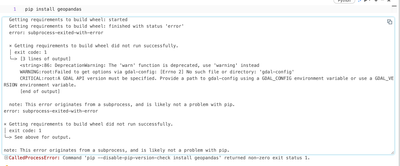
I cannot install geopandas in my notebook, ive tried all different forms of generic fix, pip installs etc but always get this error:
note: This error originates from a subprocess, and is likely not a problem with pip. error: subprocess-exited-with-error × Getting requirements to build wheel did not run successfully. │ exit code: 1 ╰─> See above for output. note: This error originates from a subprocess, and is likely not a problem with pip.
Can anyone help me with this issue?

- Mark as New
- Bookmark
- Subscribe
- Mute
- Subscribe to RSS Feed
- Permalink
- Report Inappropriate Content
04-05-2024 10:23 AM
@tomos_phillips1 - can you please try install geopandas on a single node cluster. (driver only) ?
%pip install geopandas
- Mark as New
- Bookmark
- Subscribe
- Mute
- Subscribe to RSS Feed
- Permalink
- Report Inappropriate Content
04-06-2024 04:14 AM
@shan_chandra - I do not have permission in my org to modify any cluster properties etc. Do you know of another way around this? Our internal IT team also do not have a fix for this.
- Mark as New
- Bookmark
- Subscribe
- Mute
- Subscribe to RSS Feed
- Permalink
- Report Inappropriate Content
04-10-2024 01:11 PM
@tomos_phillips1 - can you please raise a support ticket with Databricks support team to triage this further?

- Mark as New
- Bookmark
- Subscribe
- Mute
- Subscribe to RSS Feed
- Permalink
- Report Inappropriate Content
04-23-2024 04:08 AM
- Mark as New
- Bookmark
- Subscribe
- Mute
- Subscribe to RSS Feed
- Permalink
- Report Inappropriate Content
04-23-2024 07:11 AM
@tomos_phillips1 @shan_chandra
Got the below init script from Databricks Support. Worked for us in Databricks AWS Env.
dbutils.fs.put("/databricks/scripts/libinstall.sh","""
#!/bin/bash
sudo rm -r /var/lib/apt/lists/*
sudo apt clean &&
sudo apt update --fix-missing -y &&
sudo apt install -y libmysqlclient21
sudo apt install -y libgdal-dev
""", True)

- Mark as New
- Bookmark
- Subscribe
- Mute
- Subscribe to RSS Feed
- Permalink
- Report Inappropriate Content
09-06-2024 11:32 AM
Thanks so much for this it worked for me!
- Mark as New
- Bookmark
- Subscribe
- Mute
- Subscribe to RSS Feed
- Permalink
- Report Inappropriate Content
09-06-2024 11:26 AM
I have been having this issue also. Conda may well be better, but how do you use conda in databricks? From what I can see the only ways are to either use runtime 7.3 or below or use completely new type of container. Those are not feasible.
- Mark as New
- Bookmark
- Subscribe
- Mute
- Subscribe to RSS Feed
- Permalink
- Report Inappropriate Content
09-06-2024 12:29 PM
@brian999 - Conda is subjected to commercial licensing. Referenced here: https://docs.databricks.com/en/archive/legacy/conda.html
- Mark as New
- Bookmark
- Subscribe
- Mute
- Subscribe to RSS Feed
- Permalink
- Report Inappropriate Content
09-06-2024 12:41 PM - edited 09-06-2024 12:42 PM
As i said in my comment and it says on the page you just sent:
Important
%conda commands are deprecated, and are supported only for Databricks Runtime 7.3 LTS ML. Databricks recommends using %pip for managing notebook-scoped libraries. If you require Python libraries that can only be installed using conda, you can use conda-based docker containers to pre-install the libraries you need.
This is not at all a feasible way to use conda.
