Cluster Memory Issue (Termination)

- Mark as New
- Bookmark
- Subscribe
- Mute
- Subscribe to RSS Feed
- Permalink
- Report Inappropriate Content
04-11-2024 07:55 AM - edited 04-11-2024 07:58 AM
Hi,
I have a single-node personal cluster with 56GB memory(Node type: Standard_DS5_v2, runtime: 14.3 LTS ML). The same configuration is done for the job cluster as well and the following problem applies to both clusters:
To start with: once I start my cluster without attaching anything, I have high memory allocation which 18 GB is used and 4.1 GB is cached. Are all of them just Spark, Python, and my libraries? Is there a way to reduce that as it is 40% of my total memory?
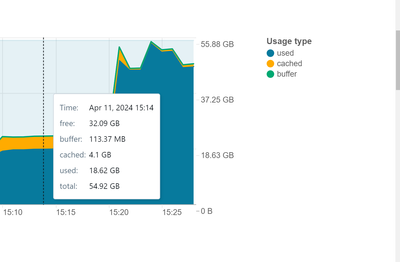
I am using .whl file to include my Python Libraries. Same libraries in my local development with virtual environment(python 3.10) takes 6.1GB space.
For my job, I run the following code piece:
train_index = spark.table("my_train_index_table")
test_index = spark.table("my_test_index_table")

abt_table = spark.table("my_abt_table").where('some_column is not null')
abt_table = abt_table.select(*cols_to_select)

train_pdf = abt_table.join(train_index , on=["index_col"], how="inner").toPandas()
test_pdf = abt_table.join(test_index , on=["index_col"], how="inner").toPandas()
my tables are all delta tables and their size is (from the catalog explorer):
my_train_index_table: 3.4MB - partition:1
my_test_index_table: 870KB - partition:1
my_abt_table: 3.8GB - partition: 40
my_abt_table on pandas after where clause: 5.5GB. This is for analysis purpose, I don't convert this spark df to pandas
my_abt_table on pandas after column selection(lots of String Type): 2.7GB This is for analysis purpose, I don't convert this spark df to pandas.
---
After running the above code cell, 2 pandas frames are created:
train_pdf is 495 MB
test_pdf is 123.7 MB
At this point when I look at the driver logs, I see that GC (Allocation Failure).
My driver info is as follows:

Peak Heap memory is 29GB which I can't make sense in this case.
I tried the following solutions both individually and combined:
1) As Arrow is enabled in my cluster, I added `spark.sql.execution.arrow.pyspark.selfDestruct.enabled True` config to my cluster to free the memory during toPandas() conversion, defined here.
2) Based on this blog I have tried G1GC for garbage collection with `XX:InitiatingHeapOccupancyPercent=35 -XX:ConcGCThread=20` and ended up with GC (Allocation Failure) again.
Based on my trials, I can see that something is blocking the GC to free the memory so eventually I get:
`The spark driver has stopped unexpectedly and is restarting. Your notebook will be automatically reattached.`
My main two question is:
1) Why the initial memory is equal to 40% of my total memory? Is it spark, python and my libraries?
2) With my train_pdf and test_pdf, I would expect `initial memory consumption + my 2 dataframe` more or less, which should be equal to 18.6GB(used)+4.1GB(cached) + 620MB(pandas dataframes), in total 25.3GB. Instead, I end up with 46.2GB(used) + 800MB(cached), in total 47GB. How this is possible?
Is there anything that I cannot see on this? This is a huge blocker for me now.
Thank you!
- Mark as New
- Bookmark
- Subscribe
- Mute
- Subscribe to RSS Feed
- Permalink
- Report Inappropriate Content
06-06-2024 03:49 AM
Hello,
Thank you for your answer. It seems to me that the reply is GPT answer. I would expect an answer from community as a person as I have tried to solve the issue with GPT already.
Nevertheless:
1) Initial Memory Allocation: Adjusting memory configuration might be a solution but my question here is that how I can do that, based on what metrics? What is the technical explanation of the issue and solution?
2) Memory Consumption with Dataframes: I am training a ML model with Logistic Regression and LightGBM with Optuna. PySpark does not provide the configuration of these ML models and hyperparam optimization so I must do toPandas() conversion and use scikit-learn and lightgbm libraries.
3) GC (Allocation Failure): Could you please provide a documentation, blog, book or any feature implementation regarding all of these so I can understand the underlying issue here?
After talking with Databricks Core Team, firstly, I was told that problem is not memory but networking issue:
"The network issue had caused the driver's IP to be out of reach, and hence, the Chauffeur assumed that the driver was dead, marked it as dead and restarted a new driver PID. Since a driver was restarted, the job failed and it should be temporary."
The problem is not temporary and it happens in irregular intervals.

For LightGBM training these are the parameters I am trying with Optuna:

I have seen that playing with n_jobs=1 or n_jobs=5 helped me to reduce the rate of error happening in my trials. However, I have observed that when n_jobs=1, jobs with smalller dataset(~150MB) finish faster compared n_jobs=5 where cross validation should be parallel and faster, which is an unexpected case. When I set n_jobs more than 1, seeing the error chance incrases.

I believe the error is coming from the threading with Optuna and LightGBM (same happens in the Logreg) now. I wonder somehow Optuna(3.5.0), lightgbm(4.3.0) and joblib(1.2.0) libraries creating the problem in the runtime. I am still keep seeing the GC during the runs as I expect them to see because I am using Optuna.study.optimize function with

I would literally appreciate a lot from the community if someone has an answer for this. I am willing to have a meeting and talk with anyone at this point.
Thanks!

- Mark as New
- Bookmark
- Subscribe
- Mute
- Subscribe to RSS Feed
- Permalink
- Report Inappropriate Content
12-31-2024 05:56 AM
Did you find a solution for this ?
