Optimizing for Recall in Azure AutoML UI

- Mark as New
- Bookmark
- Subscribe
- Mute
- Subscribe to RSS Feed
- Permalink
- Report Inappropriate Content
03-20-2024 10:07 PM - edited 03-20-2024 10:15 PM
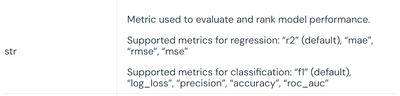
Hi all, I've been using Azure AutoML and noticed that I can choose 'recall' as my optimization metric in the notebook but not in the Azure AutoML UI. The Databricks documentation also doesn't list 'recall' as an optimization metric.
Is there a reason why recall isn't an option in the UI, or am I missing something? Any workaround or explanation would be helpful!
Thanks!
- Mark as New
- Bookmark
- Subscribe
- Mute
- Subscribe to RSS Feed
- Permalink
- Report Inappropriate Content
03-21-2024 07:18 AM
On the databricks notebook itself, I can see that databricks.automl supports using recall as a primary metric
Help on function classify in module databricks.automl:

    :param primary_metric:  primary metric to select the best model. Each trial will compute several metrics, but this one determines which model is selected from all the trials. One of "f1" (default), "log_loss", "accuracy", "precision", "recall", "roc_auc".
But this blog didn't state that in the list of primary metrics