Recovering Lost Dashboard Data

- Mark as New
- Bookmark
- Subscribe
- Mute
- Subscribe to RSS Feed
- Permalink
- Report Inappropriate Content
03-04-2025 05:35 AM
Hello,
I attempted to update the SQL warehouse ID for all our dashboards using the Databricks SDK lakeview.update method. However, I mistakenly passed a dashboard object without the serialized_dashboard value, which resulted in all our dashboards becoming empty.
Fortunately, they are still published, and I would like to know if there is any way to retrieve the JSON content from the published dashboards and use that data to restore the draft versions.
Is there a method or API call that allows us to extract the published dashboard JSON and restore our drafts?

- Mark as New
- Bookmark
- Subscribe
- Mute
- Subscribe to RSS Feed
- Permalink
- Report Inappropriate Content
03-04-2025 07:35 AM
Hi @Anton2
You can get the Dashboard-definition with the databricks cli. You need the id of the published Dashboard, which you see in the url, as example:

Then, open a Terminal, run databricks cli, and save the output in a json file:
databricks lakeview get 01efdce4fd64105f9030f5b203c77cf9 > dashboard.jsonyou can see the content in an editor:

Also with the databricks cli, you can create new dashboards. I didn't had the time to test it, but you should be able to make it work.
databricks lakeview create -h
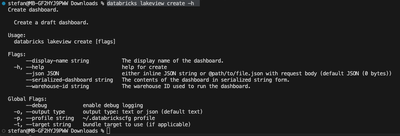
You may have to change the json-file, that only the request body is in there.
I'm looking forward to your answer as to whether it worked
- Mark as New
- Bookmark
- Subscribe
- Mute
- Subscribe to RSS Feed
- Permalink
- Report Inappropriate Content
03-04-2025 07:15 PM
Unfortunately, this approach retrieves only the draft version of the dashboard, which is already empty in our case, resulting in an empty object response. However, the published version is still working.
My question is: How can we obtain the JSON data of the published dashboard, and where is it stored?
I have reviewed the Databricks documentation but couldn't find any relevant information on this.

- Mark as New
- Bookmark
- Subscribe
- Mute
- Subscribe to RSS Feed
- Permalink
- Report Inappropriate Content
03-31-2025 08:26 AM
I'm having a similar problem. The published dashboard must be stored somewhere. Can anyone at Databricks help us here?

- Mark as New
- Bookmark
- Subscribe
- Mute
- Subscribe to RSS Feed
- Permalink
- Report Inappropriate Content
04-02-2025 04:46 AM
I am facing the same.
