agent bricks - can't figure out how to enable Knowledge Assistant

- Mark as New
- Bookmark
- Subscribe
- Mute
- Subscribe to RSS Feed
- Permalink
- Report Inappropriate Content
11-21-2025 09:13 AM
Hi, getting this error when trying to build a Knowledge Assistant agent:
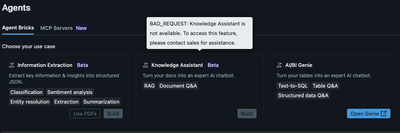
I have a premium account in the eastus region. The docs say I need to have a 'serverless budget policy' configured, but despite all my attempts, i can't get it to show up as an option in the admin settings. I sent an email to sales, but i suspect this may be a configuration issue.
- Labels:
-
agent bricks

- Mark as New
- Bookmark
- Subscribe
- Mute
- Subscribe to RSS Feed
- Permalink
- Report Inappropriate Content
11-23-2025 01:47 AM
Hi Steph, it sounds like the Knowledge Assistant requires a serverless budget policy linked to your premium account. If it’s not showing in admin settings, it’s often a region/configuration issue. I’d recommend:
Double-check that your East US account has serverless quotas enabled.
Confirm that your admin role has permission to create or assign budget policies.
If it still doesn’t appear, escalate to support with a note that the UI isn’t showing the option despite premium access—they can enable it on the backend.
This usually resolves the problem without waiting for sales responses.
