Output Not Displaying in Databricks Notebook on All-Purpose Compute Cluster

- Mark as New
- Bookmark
- Subscribe
- Mute
- Subscribe to RSS Feed
- Permalink
- Report Inappropriate Content
11-10-2025 05:57 AM
Hello All,
I’m encountering an issue where output from standard Python commands such as print() or display(df) is not showing up correctly when running notebooks on an All-Purpose Compute cluster.
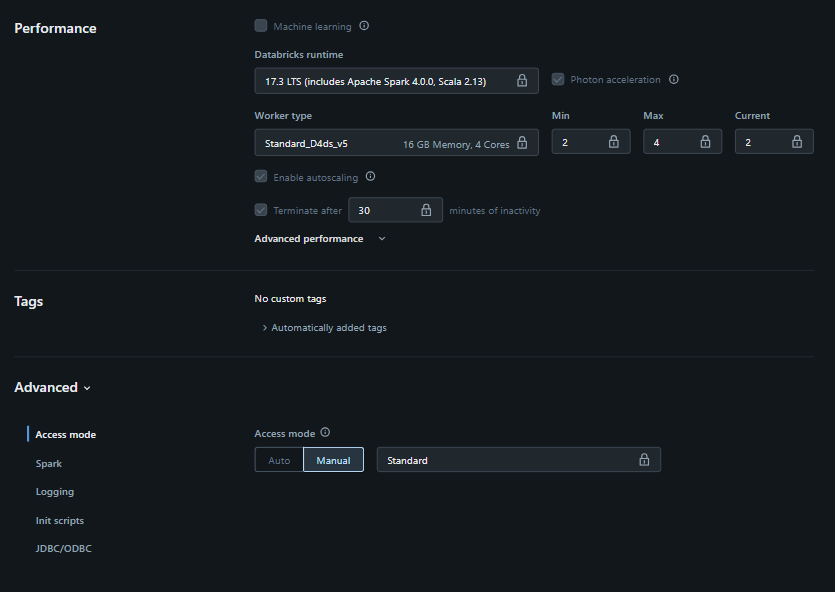
Cluster Details
Cluster Type: All-Purpose Compute
Runtime Version: 17.3 LTS (includes Apache Spark 4.0.0, Scala 2.13)
Worker Type: Standard_D4ds_v5
Policy: Shared Compute
Issue Description
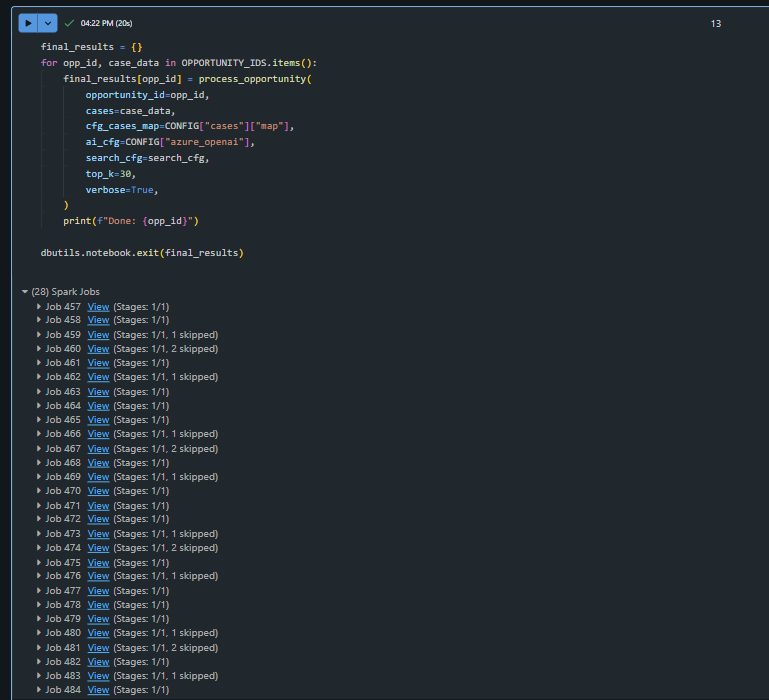
When executing cells containing PySpark code or loops, for example:
abfss_path = "abfss://fs-dev@stdev01.dfs.core.windows.net/dev/customers-100.csv"
df = spark.read.option("header", "true").csv(abfss_path)
display(df)
…the notebook executes successfully, but no output is shown in the cell, even though commands like df.show() or df.count() return results as expected.
Similarly, print() statements sometimes do not render any output.
The issue occurs only on All-Purpose Compute clusters — it works fine on Serverless clusters.
Observed Behavior
The cell shows “Executed” status, but no visible output.
If we add dbutils.notebook.exit() at the end, the returned result appears, but intermediate print() or display() outputs are missing.
Expected Behavior
The print() statements and display(df) outputs should appear in real time (or at least after cell execution), consistent with behavior observed in Serverless clusters or earlier runtimes.
Request
If there’s a configuration setting, known issue, or recommended workaround to resolve this behavior, please advise.
Thank you for your support!
- Labels:
-
Spark