- Mark as New
- Bookmark
- Subscribe
- Mute
- Subscribe to RSS Feed
- Permalink
- Report Inappropriate Content
12-17-2025 03:57 AM - edited 12-17-2025 04:09 AM
Hi Databricks Community!
This is my first post in this forum, so I hope you can forgive me if it's not according to the forum best practices 🙂
After lots of searching, I decided to share the peculiar issue I'm running into in this community.
I try to load a JSON format that is exposed via the Home Assistant /api/history/period/ endpoint. The format consists of an array of arrays:
[
   [
      {
         "entity_id": "sensor.solaredge_lifetime_energy",
         "state": "19848848.0",
         "attributes": {
            "state_class": "total",
            "unit_of_measurement": "Wh",
            "device_class": "energy",
            "friendly_name": "solaredge Lifetime energy"
         },
         "last_changed": "2025-12-14T23:00:00+00:00",
         "last_updated": "2025-12-14T23:00:00+00:00"
      },
      { ... }
   ],
   [ ... ]
]
Each array contains measurements of a specific sensor. Every object has the same 5 properties / fields.
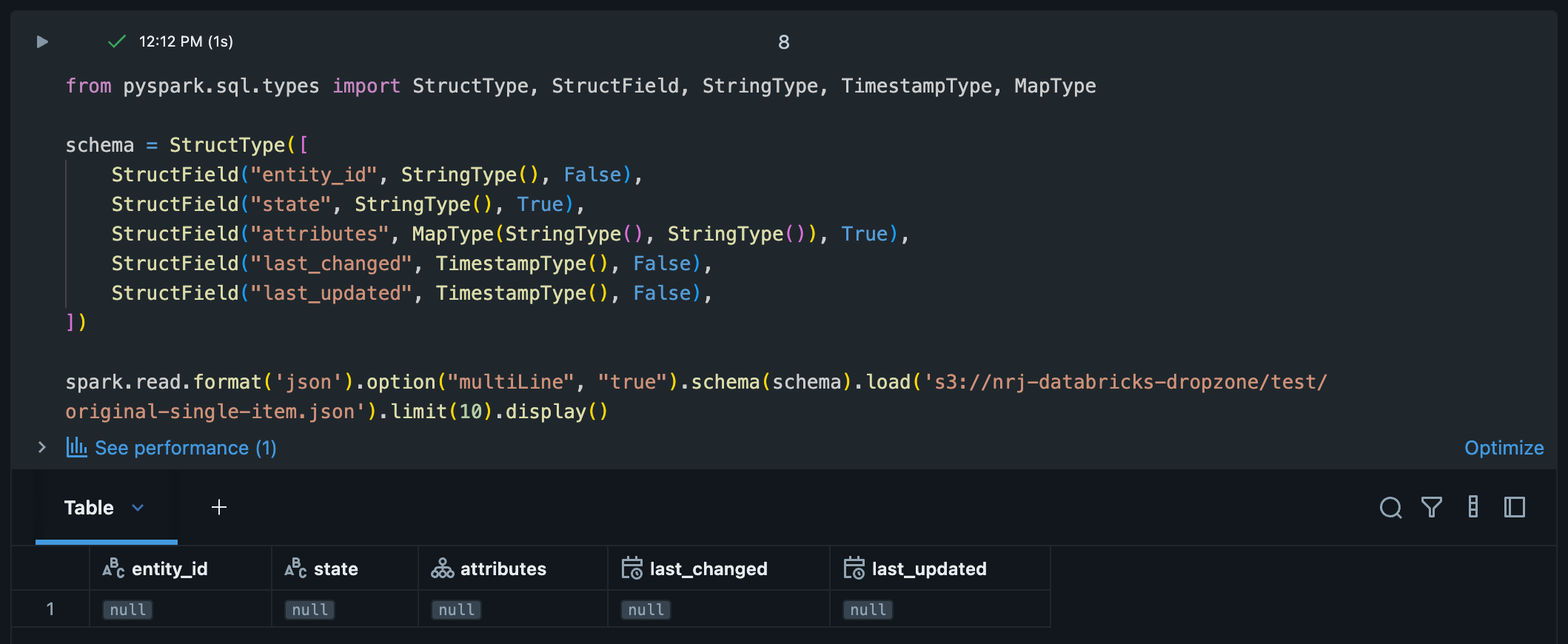
The file(s) live in S3 and I try to read them as follows:
schema = StructType([
   StructField("entity_id", StringType(), False),
   StructField("state", StringType(), True),
   StructField("attributes", MapType(StringType(), StringType()), True),
   StructField("last_changed", TimestampType(), False),
   StructField("last_updated", TimestampType(), False),
])

spark.read.format('json').option("multiLine", "true").schema(schema).load(<S3 location>).limit(10).display()
For some strange reason the result is 1 row per file with all null values, while the correct columns are there.
I tried / checked different things so far:
- Validated the JSON: The JSON file is valid and doesn't contain any malformed / missing values.
- I 'flattened' the list of lists to a single top-level list using flattened = [element for sub_list in data for element in sub_list]. The resulting JSON is loaded just fine and is exactly what I want as the output.
- I tried removing the schema definition, but the result remains the same.
Any suggestions? I don't think I should transform the source JSON in order to be able to load it using Spark.
- Labels:
-
Spark

- Mark as New
- Bookmark
- Subscribe
- Mute
- Subscribe to RSS Feed
- Permalink
- Report Inappropriate Content
12-17-2025 05:18 AM
Greetings @Joost1024 , I did some digging.
You’re running into a root type mismatch.
Your JSON’s top level is an array of arrays, but the schema you provided describes a single struct (one record). Spark can’t reconcile those two shapes, so it does what it always does in this situation: it gives you one row per file and fills the struct fields with nulls.
What’s happening
The file’s root is an array of arrays of structs — think [[{...}, {...}], [...]]. Your schema, however, describes only the inner object, not the outer container. When multiLine JSON is enabled, Spark treats each file as a single JSON value. Since the root type doesn’t match the schema, Spark can’t align the fields and you end up with nulls across the board.
The good news: you don’t need to change the source JSON. There are two clean ways to handle this directly in Spark.
Option A: Let Spark infer the nested arrays, then explode twice
Have Spark read the file as-is, infer the shape, and flatten it step by step:
from pyspark.sql import functions as F

df0 = (spark.read.format("json")
       .option("multiLine", "true")
       .load("<S3 location>"))

# df0 has a single column `value`: array<array<struct<entity_id,...>>>
df = (df0
      .select(F.explode("value").alias("arr"))   # array<struct>
      .select(F.explode("arr").alias("row"))     # struct
      .select(
          "row.entity_id",
          F.col("row.state").alias("state"),
          "row.attributes",
          F.to_timestamp(
              "row.last_changed",
              "yyyy-MM-dd'T'HH:mm:ssXXX"
          ).alias("last_changed"),
          F.to_timestamp(
              "row.last_updated",
              "yyyy-MM-dd'T'HH:mm:ssXXX"
          ).alias("last_updated"),
      ))

display(df.limit(10))
A couple of notes:
-
The timestamp pattern yyyy-MM-dd'T'HH:mm:ssXXX correctly handles ISO-8601 offsets like +00:00.
-
If state should be numeric, just cast it after the explode.
Option B: Define a schema that actually matches the root
Instead of fighting the JSON shape, describe it accurately: a single top-level field that is an array of arrays of structs.
from pyspark.sql import functions as F, types as T

inner = T.StructType([
    T.StructField("entity_id", T.StringType(), False),
    T.StructField("state", T.StringType(), True),
    T.StructField("attributes", T.MapType(T.StringType(), T.StringType()), True),
    T.StructField("last_changed", T.StringType(), False),
    T.StructField("last_updated", T.StringType(), False),
])

schema = T.StructType([
    T.StructField("value", T.ArrayType(T.ArrayType(inner)), True)
])

df0 = (spark.read.format("json")
       .option("multiLine", "true")
       # .option("primitivesAsString", "true")  # optional, see notes below
       .schema(schema)
       .load("<S3 location>"))

df = (df0
      .select(F.explode("value").alias("arr"))
      .select(F.explode("arr").alias("row"))
      .select(
          "row.entity_id",
          F.col("row.state").alias("state"),
          "row.attributes",
          F.to_timestamp(
              "row.last_changed",
              "yyyy-MM-dd'T'HH:mm:ssXXX"
          ).alias("last_changed"),
          F.to_timestamp(
              "row.last_updated",
              "yyyy-MM-dd'T'HH:mm:ssXXX"
          ).alias("last_updated"),
      ))

display(df.limit(10))
Extra tips worth knowing
If attributes can contain numbers or booleans, you have a couple of safe options:
-
Use .option("primitivesAsString", "true") so everything lands as strings and nothing silently becomes null.
-
Or widen the map type and normalize downstream once the data is flattened.
Also worth calling out: your original approach worked once you flattened the JSON externally because you removed that extra array level. The double-explode here is doing the same thing, just inside Spark where it belongs.
Hope this helps, Louis.
- Mark as New
- Bookmark
- Subscribe
- Mute
- Subscribe to RSS Feed
- Permalink
- Report Inappropriate Content
12-17-2025 05:32 AM
Thank you so much for your extensive explanation @Louis_Frolio! Now it makes complete sense.
- Mark as New
- Bookmark
- Subscribe
- Mute
- Subscribe to RSS Feed
- Permalink
- Report Inappropriate Content
12-17-2025 05:59 AM
I guess I was a bit over enthusiastic by accepting the answer.
When I run the following on the single object array of arrays (as shown in the original post) I get a single row with column "value" and value null.
from pyspark.sql import functions as F, types as T

inner = T.StructType([
   T.StructField("entity_id", T.StringType(), False),
   T.StructField("state", T.StringType(), True),
   T.StructField("attributes", T.MapType(T.StringType(), T.StringType()), True),
   T.StructField("last_changed", T.StringType(), False),
   T.StructField("last_updated", T.StringType(), False),
])

schema = T.StructType([
   T.StructField("value", T.ArrayType(T.ArrayType(inner)), True)
])

df0 = (spark.read.format("json")
   .option("multiLine", "true")
   .option("primitivesAsString", "true")
   .schema(schema)
   .load("<S3 path>/original-single-item.json"))

display(df0)
- Mark as New
- Bookmark
- Subscribe
- Mute
- Subscribe to RSS Feed
- Permalink
- Report Inappropriate Content
12-19-2025 06:11 AM
Any idea @Louis_Frolio? Is this DF supposed to be displayed as null?

- Mark as New
- Bookmark
- Subscribe
- Mute
- Subscribe to RSS Feed
- Permalink
- Report Inappropriate Content
12-20-2025 03:26 AM
Hi @Joost1024 ,
So here's the issue. It seems that JSON DataFrameReader expects to have a JSON object. But in your case we're dealing with JSON array at root level - not a JSON object.
So for instance,if we would just rewrite your file in following way then spark would be able to infer schema without any issues:
{
    "data": [
            [
                {
                "entity_id": "sensor.solaredge_lifetime_energy",
                "state": "19848848.0",
                "attributes": {
                    "state_class": "total",
                    "unit_of_measurement": "Wh",
                    "device_class": "energy",
                    "friendly_name": "solaredge Lifetime energy"
                },
                "last_changed": "2025-12-14T23:00:00+00:00",
                "last_updated": "2025-12-14T23:00:00+00:00"
                },
                {
                "entity_id": "sensor.solaredge_lifetime_energy",
                "state": "19849120.0",
                "attributes": {
                    "state_class": "total",
                    "unit_of_measurement": "Wh",
                    "device_class": "energy",
                    "friendly_name": "solaredge Lifetime energy"
                },
                "last_changed": "2025-12-14T23:15:00+00:00",
                "last_updated": "2025-12-14T23:15:00+00:00"
                },
                {
                "entity_id": "sensor.solaredge_lifetime_energy",
                "state": "19849580.0",
                "attributes": {
                    "state_class": "total",
                    "unit_of_measurement": "Wh",
                    "device_class": "energy",
                    "friendly_name": "solaredge Lifetime energy"
                },
                "last_changed": "2025-12-14T23:30:00+00:00",
                "last_updated": "2025-12-14T23:30:00+00:00"
                }
            ],
            [
                {
                "entity_id": "sensor.home_temperature",
                "state": "21.5",
                "attributes": {
                    "state_class": "measurement",
                    "unit_of_measurement": "°C",
                    "device_class": "temperature",
                    "friendly_name": "Home Temperature"
                },
                "last_changed": "2025-12-14T23:00:00+00:00",
                "last_updated": "2025-12-14T23:00:00+00:00"
                },
                {
                "entity_id": "sensor.home_temperature",
                "state": "21.3",
                "attributes": {
                    "state_class": "measurement",
                    "unit_of_measurement": "°C",
                    "device_class": "temperature",
                    "friendly_name": "Home Temperature"
                },
                "last_changed": "2025-12-14T23:15:00+00:00",
                "last_updated": "2025-12-14T23:15:00+00:00"
                }
            ],
            [
                {
                "entity_id": "sensor.power_consumption",
                "state": "1250.0",
                "attributes": {
                    "state_class": "measurement",
                    "unit_of_measurement": "W",
                    "device_class": "power",
                    "friendly_name": "Power Consumption"
                },
                "last_changed": "2025-12-14T23:00:00+00:00",
                "last_updated": "2025-12-14T23:00:00+00:00"
                },
                {
                "entity_id": "sensor.power_consumption",
                "state": "1180.0",
                "attributes": {
                    "state_class": "measurement",
                    "unit_of_measurement": "W",
                    "device_class": "power",
                    "friendly_name": "Power Consumption"
                },
                "last_changed": "2025-12-14T23:15:00+00:00",
                "last_updated": "2025-12-14T23:15:00+00:00"
                },
                {
                "entity_id": "sensor.power_consumption",
                "state": "1320.0",
                "attributes": {
                    "state_class": "measurement",
                    "unit_of_measurement": "W",
                    "device_class": "power",
                    "friendly_name": "Power Consumption"
                },
                "last_changed": "2025-12-14T23:30:00+00:00",
                "last_updated": "2025-12-14T23:30:00+00:00"
                },
                {
                "entity_id": "sensor.power_consumption",
                "state": "1295.0",
                "attributes": {
                    "state_class": "measurement",
                    "unit_of_measurement": "W",
                    "device_class": "power",
                    "friendly_name": "Power Consumption"
                },
                "last_changed": "2025-12-14T23:45:00+00:00",
                "last_updated": "2025-12-14T23:45:00+00:00"
                }
            ]
            ]

}

Ok, so for json arrays as a top objects we can try different approach. We can read json file as a text (important thing here - we want to use option wholeText=True to not split by new lines) and then use from_json function to parse it correctly:
from pyspark.sql.functions import lit, from_json, col, explode
from pyspark.sql.types import StructType, StructField, ArrayType, StringType


attributes_schema = StructType([
    StructField("state_class", StringType(), nullable=True),
    StructField("unit_of_measurement", StringType(), nullable=True),
    StructField("device_class", StringType(), nullable=True),
    StructField("friendly_name", StringType(), nullable=True)
])

sensor_reading_schema = StructType([
    StructField("entity_id", StringType(), nullable=True),
    StructField("state", StringType(), nullable=True),
    StructField("attributes", attributes_schema, nullable=True),
    StructField("last_changed", StringType(), nullable=True),
    StructField("last_updated", StringType(), nullable=True)
])


df_text = spark.read.text('/Volumes/logging_demo/default/logs/sample_data.json', wholetext=True)

array_schema = ArrayType(ArrayType(sensor_reading_schema))
df_parsed = df_text.select(from_json(col("value"), array_schema).alias("data"))


# df_flat = df_parsed.select(explode(col("data")).alias("inner_array")) \
#                    .select(explode(col("inner_array")).alias("sensor")) \
#                    .select("sensor.*")

display(df_parsed)
And as you can see on below screenshot - now we parsed our file correctly:

Of course you can flattened it further - just uncomment df_flat dataframe.
- Mark as New
- Bookmark
- Subscribe
- Mute
- Subscribe to RSS Feed
- Permalink
- Report Inappropriate Content
12-22-2025 08:00 AM
Nice job @szymon_dybczak . Thanks for helping to make Databricks Community stronger!
Cheers, Louis.