Use Python notebook to read data from Databricks

Options
- Mark as New
- Bookmark
- Subscribe
- Mute
- Subscribe to RSS Feed
- Permalink
- Report Inappropriate Content
03-04-2025 11:11 PM
I'm very new to Databricks. I hope this is the right place to ask this question.
I want to use PySpark in a notebook to read data from a Databricks database with the below codes.
databricks_host = "adb-xxxx.azuredatabricks.net"
http_path = "/sql/1.0/warehouses/xxxx"
access_token = "dapixxxx"
jdbc_url = f"jdbc:databricks://{databricks_host}:443/default;transportMode=http;ssl=1;httpPath={http_path};AuthMech=3"

query = "(SELECT DISTINCT building_code, city FROM wphub_poc.gold.v_d_building) as subquery"

df = (spark.read.format("jdbc")
    .option("url", jdbc_url)
    .option("query", query)
    .option("user", "token")
    .option("password", access_token)
    .option("driver", "com.databricks.client.jdbc.Driver")
    .option("fetchsize", "10000")
    .load())

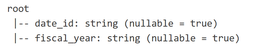
print(df.printSchema())
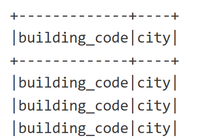
print(df.show())
However, the df result only contains the litteral texts from the SELECT query, like this. Do I do anything wrong and how to fix it? Thank you!
Labels:
- Labels:
-
Read data
