
- Mark as New
- Bookmark
- Subscribe
- Mute
- Subscribe to RSS Feed
- Permalink
- Report Inappropriate Content
01-11-2024 10:20 PM
Thanks Walter and Debayan to given the reply . We given the permission as per model and below are screen shots for reference.
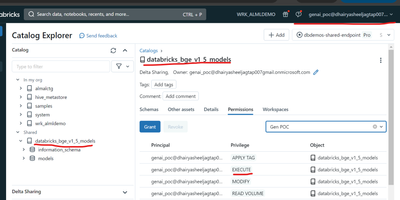
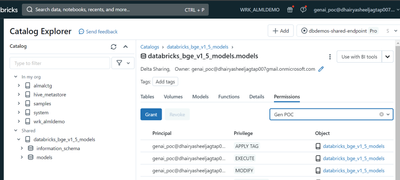
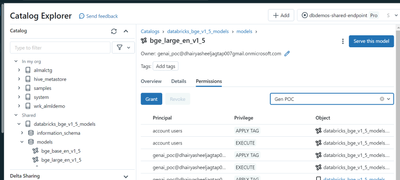
We started to understand about LLM Chatbot With Retrieval Augmented Generation (RAG) and Llama 2 70B(https://notebooks.databricks.com/demos/llm-rag-chatbot/index.html#). We did the below steps before execute the code .
- We created the trail account in azure portal and created azure databricks with premium tier.
- Created the storage account with same resource group
- Created the azure access connect Access Connector for Azure Databricks
- Given the permission to the Azure Access Connector to access Storage
- In the Storage Account, using IAM given permission to Azure Access Connector Databricks
- We launched the Databricks and created a temporary cluster with 14GB memory and 4 Cores.
- Followed the tutorial (LLM Chatbot With Retrieval Augmented Generation (RAG) and Llama 2 70B)
- Executed the below commands .
%pip install dbdemos
import dbdemos
dbdemos.install('llm-rag-chatbot')
9.Once executed the above commands, all related notebokes and cluster created but while start the cluster which is provided the demo , faced the error with insufficient executors then used the cluster which created temporary one at step 6. Then we are able to executed some of the commands until Splitting our html pages in smaller chunks in 01-Data-Preparation-and-Index note book
10. While running the next command Using Databricks Foundation model BGE as an embedding endpoint , here we created the model from databricks market place and tried to serve endpoint but we are getting access issue (permission issue).
