Sample Datasets URL in Azure Databricks / access sample datasets when NPIP and Firewall is enabled

- Mark as New
- Bookmark
- Subscribe
- Mute
- Subscribe to RSS Feed
- Permalink
- Report Inappropriate Content
02-07-2023 07:51 PM
Hi,
I have an Azure Databricks instance configured to use VNet injection with secure cluster connectivity. I have an Azure Firewall configured and controlling all traffic ingress and egress locations as per this article: https://learn.microsoft.com/en-us/azure/databricks/resources/supported-regions#--dbfs-root-blob-stor...
I can access the Hive metastore, DBFS via the internal storage account etc etc, basically the cluster is up and running and I seem to have whitelisted every domain or IP for connectivity to work as per the article.
However, the one thing I can't get running is the sample-datasets mount on DBFS. Every time I try to access the mount it times out:
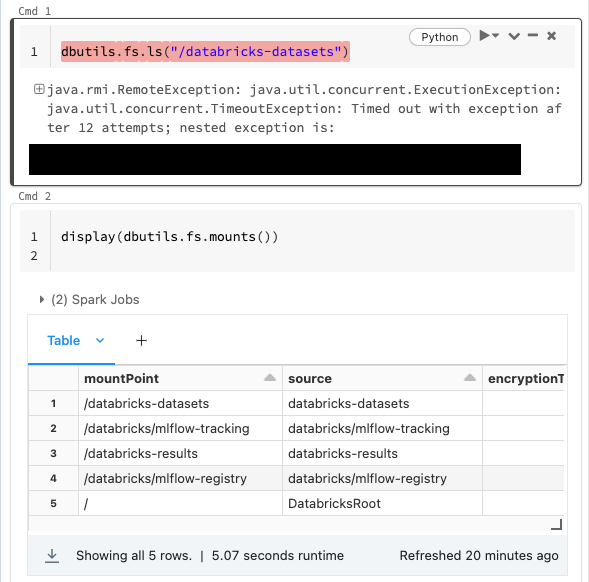
I'm going to assume that it's because I haven't whitelisted the underlying storage location of this dataset source. When I list the mounts it doesn't give me any more detail:
mountPoint	source	encryptionType
/databricks-datasets	databricks-datasets
/databricks/mlflow-tracking	databricks/mlflow-tracking
/databricks-results	databricks-results
/databricks/mlflow-registry	databricks/mlflow-registry
/	DatabricksRoot
Looking at the exception, it seems to time out on an S3 client, so I assume it's actually reading an S3 bucket in AWS somewhere:
---------------------------------------------------------------------------
ExecutionError                            Traceback (most recent call last)
<command-3658692990033083> in <cell line: 1>()
----> 1 dbutils.fs.ls("/databricks-datasets")

/databricks/python_shell/dbruntime/dbutils.py in f_with_exception_handling(*args, **kwargs)
    360                     exc.__context__ = None
    361                     exc.__cause__ = None
--> 362                     raise exc
    363
    364             return f_with_exception_handling

ExecutionError: An error occurred while calling o374.ls.
: java.rmi.RemoteException: java.util.concurrent.ExecutionException: java.util.concurrent.TimeoutException: Timed out with exception after 12 attempts; nested exception is:
	java.util.concurrent.ExecutionException: java.util.concurrent.TimeoutException: Timed out with exception after 12 attempts
	at com.databricks.backend.daemon.data.client.DbfsClient.send0(DbfsClient.scala:135)
	at com.databricks.backend.daemon.data.client.DbfsClient.sendIdempotent(DbfsClient.scala:69)
	at com.databricks.backend.daemon.data.client.RemoteDatabricksStsClient.getSessionTokenFor(DbfsClient.scala:311)
	at com.databricks.backend.daemon.data.client.DatabricksSessionCredentialsProvider.startSession(DatabricksSessionCredentialsProvider.scala:56)
	at com.databricks.backend.daemon.data.client.DatabricksSessionCredentialsProvider.getCredentials(DatabricksSessionCredentialsProvider.scala:46)
	at com.databricks.backend.daemon.data.client.DatabricksSessionCredentialsProvider.getCredentials(DatabricksSessionCredentialsProvider.scala:34)
	at com.amazonaws.http.AmazonHttpClient$RequestExecutor.getCredentialsFromContext(AmazonHttpClient.java:1266)
	at com.amazonaws.http.AmazonHttpClient$RequestExecutor.runBeforeRequestHandlers(AmazonHttpClient.java:842)
	at com.amazonaws.http.AmazonHttpClient$RequestExecutor.doExecute(AmazonHttpClient.java:792)
	at com.amazonaws.http.AmazonHttpClient$RequestExecutor.executeWithTimer(AmazonHttpClient.java:779)
	at com.amazonaws.http.AmazonHttpClient$RequestExecutor.execute(AmazonHttpClient.java:753)
	at com.amazonaws.http.AmazonHttpClient$RequestExecutor.access$500(AmazonHttpClient.java:713)
	at com.amazonaws.http.AmazonHttpClient$RequestExecutionBuilderImpl.execute(AmazonHttpClient.java:695)
	at com.amazonaws.http.AmazonHttpClient.execute(AmazonHttpClient.java:559)
	at com.amazonaws.http.AmazonHttpClient.execute(AmazonHttpClient.java:539)
	at com.amazonaws.services.s3.AmazonS3Client.invoke(AmazonS3Client.java:5453)
	at com.amazonaws.services.s3.AmazonS3Client.getBucketRegionViaHeadRequest(AmazonS3Client.java:6428)
	at com.amazonaws.services.s3.AmazonS3Client.fetchRegionFromCache(AmazonS3Client.java:6401)
	at com.amazonaws.services.s3.AmazonS3Client.invoke(AmazonS3Client.java:5438)
	at com.amazonaws.services.s3.AmazonS3Client.invoke(AmazonS3Client.java:5400)
	at com.amazonaws.services.s3.AmazonS3Client.invoke(AmazonS3Client.java:5394)
	at com.amazonaws.services.s3.AmazonS3Client.listObjectsV2(AmazonS3Client.java:971)
	at shaded.databricks.org.apache.hadoop.fs.s3a.EnforcingDatabricksS3Client.listObjectsV2(EnforcingDatabricksS3Client.scala:214)
Is there any documentation on where this storage account actually is? Can it be accessed with an Azure Firewall configured to filter traffic?
Thanks,
Alex
- Labels:
-
Azure databricks
-
DBFS