Change Databricks Connection on Power BI (service)

- Mark as New
- Bookmark
- Subscribe
- Mute
- Subscribe to RSS Feed
- Permalink
- Report Inappropriate Content
08-18-2023 04:57 PM
We're creating a report with Power BI using data from our AWS Databricks workspace. Currently, I can view the report on Power BI (service) after publishing. Is there a way to change the data source connection, e.g. if I want to change the data source from Dev to Prod data or a different workspace?
- Mark as New
- Bookmark
- Subscribe
- Mute
- Subscribe to RSS Feed
- Permalink
- Report Inappropriate Content
08-21-2023 02:02 PM
Hi @Retired_mod,
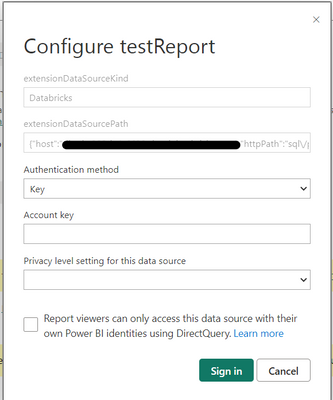
Thanks for your reply! It seems possible, but I'm stuck on step 3, since `extensionDataSourcePath` is greyed out. Everything else is editable. What permissions do I need in order to update that field?

- Mark as New
- Bookmark
- Subscribe
- Mute
- Subscribe to RSS Feed
- Permalink
- Report Inappropriate Content
05-28-2024 01:31 PM
Have you got any solution for this?

- Mark as New
- Bookmark
- Subscribe
- Mute
- Subscribe to RSS Feed
- Permalink
- Report Inappropriate Content
12-04-2024 07:02 AM
In the Power BI transform data view, you should be able to access the M-Query code and actually change the server and the host directly. My recommendation is to create a couple of parameters to keep this info for all your queries. Then you can just change these once to change your databricks source.
