AccessDenied error on s3a:// bucket due to Serverless Network Policy in Databricks SQL Endpoint

- Mark as New
- Bookmark
- Subscribe
- Mute
- Subscribe to RSS Feed
- Permalink
- Report Inappropriate Content
06-20-2025 03:06 AM
I wrote this code in Notebook
err in sql query
INTERNAL: [UNAUTHORIZED_ACCESS] Unauthorized access: s3a://testbuket114/: getFileStatus on s3a://testbuket114/: com.amazonaws.services.s3.model.AmazonS3Exception: Access to storage destination is denied because of serverless network policy; request: GET http://testbuket114.s3.us-east-1.amazonaws.com {key=[], key=[false], key=[2], key=[2], key=[/]} Hadoop 3.3.6, aws-sdk-java/1.12.638 Linux/5.15.0-1072-aws OpenJDK_64-Bit_Server_VM/17.0.13+11-LTS java/17.0.13 scala/2.12.15 kotlin/1.9.10 vendor/Azul_Systems,_Inc. cfg/retry-mode/legacy com.amazonaws.services.s3.model.ListObjectsV2Request; Request ID: null, Extended Request ID: null, Cloud Provider: AWS, Instance ID: unknown credentials-provider: com.amazonaws.auth.BasicSessionCredentials credential-header: AWS4-HMAC-SHA256 Credential=REDACTED_ACCESS_KEY(da3c912f)/20250620/us-east-1/s3/aws4_request signature-present: true (Service: Amazon S3; Status Code: 403; Error Code: AccessDenied; Request ID: null; S3 Extended Request ID: null; Proxy: 192.168.200.20), S3 Extended Request ID: null:AccessDenied SQLSTATE: 42501
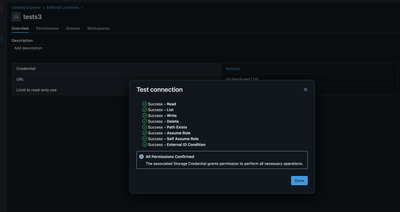
I already create external location in catalog
and credential
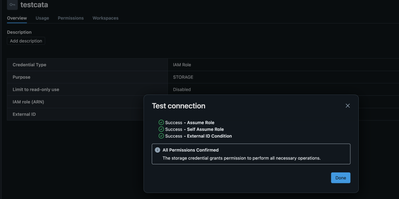
Despite all this, I still get the same error with no Request ID or Extended Request ID.
Has anyone encountered this issue or have suggestions on what else I should check or configure? Could there be caching or propagation delays in the Serverless Network Policy? Or any other hidden settings that might block access?
Thanks in advance for your help!

- Mark as New
- Bookmark
- Subscribe
- Mute
- Subscribe to RSS Feed
- Permalink
- Report Inappropriate Content
06-22-2025 04:16 AM
Hello @jeremylllin ,
From the error message:
Access to storage destination is denied because of serverless network policy
Databricks serverless environments require explicit network access policies to reach AWS resources like S3. Even if you’ve already configured credentials and external locations, these policies act as an extra layer of protection.
Check your account Network policies(Serverless) in the admin console under Cloud resources > Network > Network policies (Serverless):

Check if you have "Allow access to all destinations"
If that doesn't solve your problems check this Serverless Network Access Control for AWS
This page explains how to configure private connectivity from Serverless compute to your in-region AWS S3 buckets using the Databricks account console UI.
A dedicated and private connection: Ensures secure and isolated access between your serverless workspaces and AWS S3, limiting access to authorized connections only.

Hope this helps, 🙂
Isi
