
- Mark as New
- Bookmark
- Subscribe
- Mute
- Subscribe to RSS Feed
- Permalink
- Report Inappropriate Content
01-02-2026 02:55 AM
We have problem with import any python files as module on VNET injected workspace.
- For same folder structure (see bellow), the imports works on serverless clusters or in databricks managed workspace (i.e. create new azure databricks workspace without networking), but not in VNET injected workspace.
- no firewall (we dont have hub-spoke architecture), only NSG, NAT and public dns zones (privatelink.azuredatabricks.net, privatelink.dfs.core.windows.net)
- NSG rules:
- NSG rules:
- no firewall (we dont have hub-spoke architecture), only NSG, NAT and public dns zones (privatelink.azuredatabricks.net, privatelink.dfs.core.windows.net)
- workspace netowrking setting (SCC enables, public access enabled, no azure datbairkcs rules)+ PE to back-end connectivity
- Once we create any kind of cluster (unrestricted, shared, personal or job) the import issue arise. Tested with runtimes 17.4 and 16.4.
- Py files appears to be visible but empty from the cluster perspective. (we alsp see errno 5 file exists issues
- %run works for notebook but cant import func between notebooksTrivial import test:


On serverless (OK):

Any idea what to check or might be missing? I suspect some networking missconfiguration but cant find potentials issue.
- Labels:
-
import
-
Networking
-
Vnet

- Mark as New
- Bookmark
- Subscribe
- Mute
- Subscribe to RSS Feed
- Permalink
- Report Inappropriate Content
01-03-2026 01:55 PM
Try to go via this manual https://learn.microsoft.com/en-us/azure/databricks/security/network/classic/private-link-standard
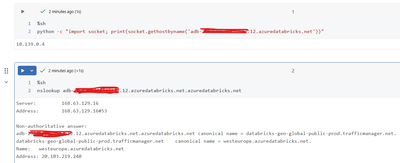
It looks like problem with 443 connection from cluster to control plane. Check also:
%sh
python -c "import socket; print(socket.gethostbyname('<YOUR-WORKSPACE-HOST>.azuredatabricks.net'))"
nslookup <YOUR-WORKSPACE-HOST>.azuredatabricks.net

%sh
curl -I -sS https://<YOUR-WORKSPACE-HOST>.azuredatabricks.net | head
My blog: https://databrickster.medium.com/
- Mark as New
- Bookmark
- Subscribe
- Mute
- Subscribe to RSS Feed
- Permalink
- Report Inappropriate Content
01-05-2026 12:22 AM
I will try to recreate manualy the workspace manually since we deployed it via ARM, but by checking the private-link-standard documentation steps, I think we have same more-less the same setup except for different CIDR ranges for subnets.
For the commands, I dont see anything unussual
- Mark as New
- Bookmark
- Subscribe
- Mute
- Subscribe to RSS Feed
- Permalink
- Report Inappropriate Content
01-05-2026 12:30 AM
Adding sh error to see file content:

- Mark as New
- Bookmark
- Subscribe
- Mute
- Subscribe to RSS Feed
- Permalink
- Report Inappropriate Content
01-06-2026 05:49 AM
Redeploying workspace from azure portal worked with "documentation" VNET injection set up with NSG and NAT gw. Only added new NSG rule on top of deployed rules
| Outbound | TCP | VirtualNetwork | Any | AzureDatabricks (service tag) | 443, 3306, 8443-8451 |
No idea where the issue was. Most likely in egress.
