MLFlow Detailed Trace view doesn't work in some workspaces

- Mark as New
- Bookmark
- Subscribe
- Mute
- Subscribe to RSS Feed
- Permalink
- Report Inappropriate Content
01-07-2026 03:44 AM
I've created a Databricks Model Serving Endpoint which serves an MLFlow Pyfunc model. The model uses langchain and I'm using mlflow.langchain.autolog().
At my company we have some production(-like) workspaces where users cannot e.g. run Notebooks and everything is done my Service Principals (e.g. in Jobs).
In those workspaces, I cannot use the detailed trace view to inspect my MLFlow traces. I can see a list of traces in the Experiments UI

but when I click on an individual trace, I get something like

and not the clean Langchain detailed view like
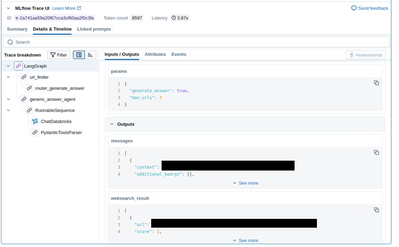
Interestingly, if I use another workspace (where human users have more access) to `display` the Inference Table in a Notebook similar to [this](https://docs.databricks.com/aws/en/mlflow3/genai/tracing/observe-with-traces/ui-traces#tracing-in-da...), I can access this nice detailed view.
Is there a workspace setting (or access to compute resources) that is necessary in order to display the Detailed Trace view?
- Labels:
-
Model Serving
