- Mark as New
- Bookmark
- Subscribe
- Mute
- Subscribe to RSS Feed
- Permalink
- Report Inappropriate Content
2 weeks ago
Hi,
I'm experiencing an issue with Visual Data Prep where some source tables appear to contain fewer rows than expected.
When I query the same tables directly using SQL, I can see all records. However, when loading certain tables into Visual Data Prep through a Source operator, the row count appears to be much lower.
What makes this confusing is that the issue only happens for some tables.
For other tables, when I set Rows scanned = Max, all rows appear to be available as expected.
For the affected tables, the lower row count is already visible immediately after the Source step, before I perform any joins, filters, or transformations.
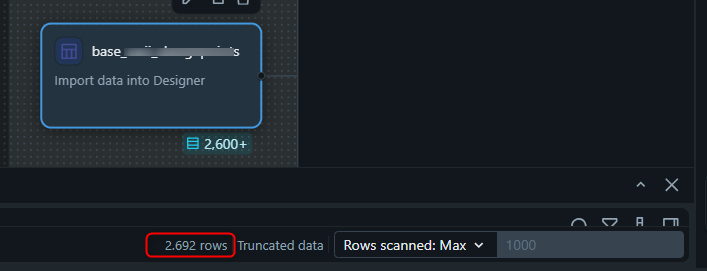
I've included two screenshots:
- A SQL count showing the table contains 4,168 rows.
- The same table loaded into Visual Data Prep, where the Source operator only shows approximately 2,692 rows.
This difference is visible before any transformations are applied.
My questions are:
- Does Visual Data Prep automatically sample data for certain tables?
- Can "Truncated data" affect the displayed row count?
- Is there any known limitation that would cause some source tables to show fewer rows than are available in SQL?
- Has anyone experienced different row counts between a SQL query and the Source operator in Visual Data Prep?
Any suggestions on how to troubleshoot this would be greatly appreciated.
Thanks!