
Turn on suggestions
Auto-suggest helps you quickly narrow down your search results by suggesting possible matches as you type.
Showing results for
Administration & Architecture
Explore discussions on Databricks administration, deployment strategies, and architectural best practices. Connect with administrators and architects to optimize your Databricks environment for performance, scalability, and security.
Turn on suggestions
Auto-suggest helps you quickly narrow down your search results by suggesting possible matches as you type.
Showing results for
- Databricks Community
- Administration & Architecture
- Re: Databricks Asset Bundles Deploy Apps
Options
- Subscribe to RSS Feed
- Mark Topic as New
- Mark Topic as Read
- Float this Topic for Current User
- Bookmark
- Subscribe
- Mute
- Printer Friendly Page

Options
- Mark as New
- Bookmark
- Subscribe
- Mute
- Subscribe to RSS Feed
- Permalink
- Report Inappropriate Content
02-11-2026 11:50 PM - edited 02-11-2026 11:55 PM
Hello,
I checked bundle app example in Github. https://github.com/databricks/bundle-examples/blob/main/knowledge_base/app_with_database/resources/m...
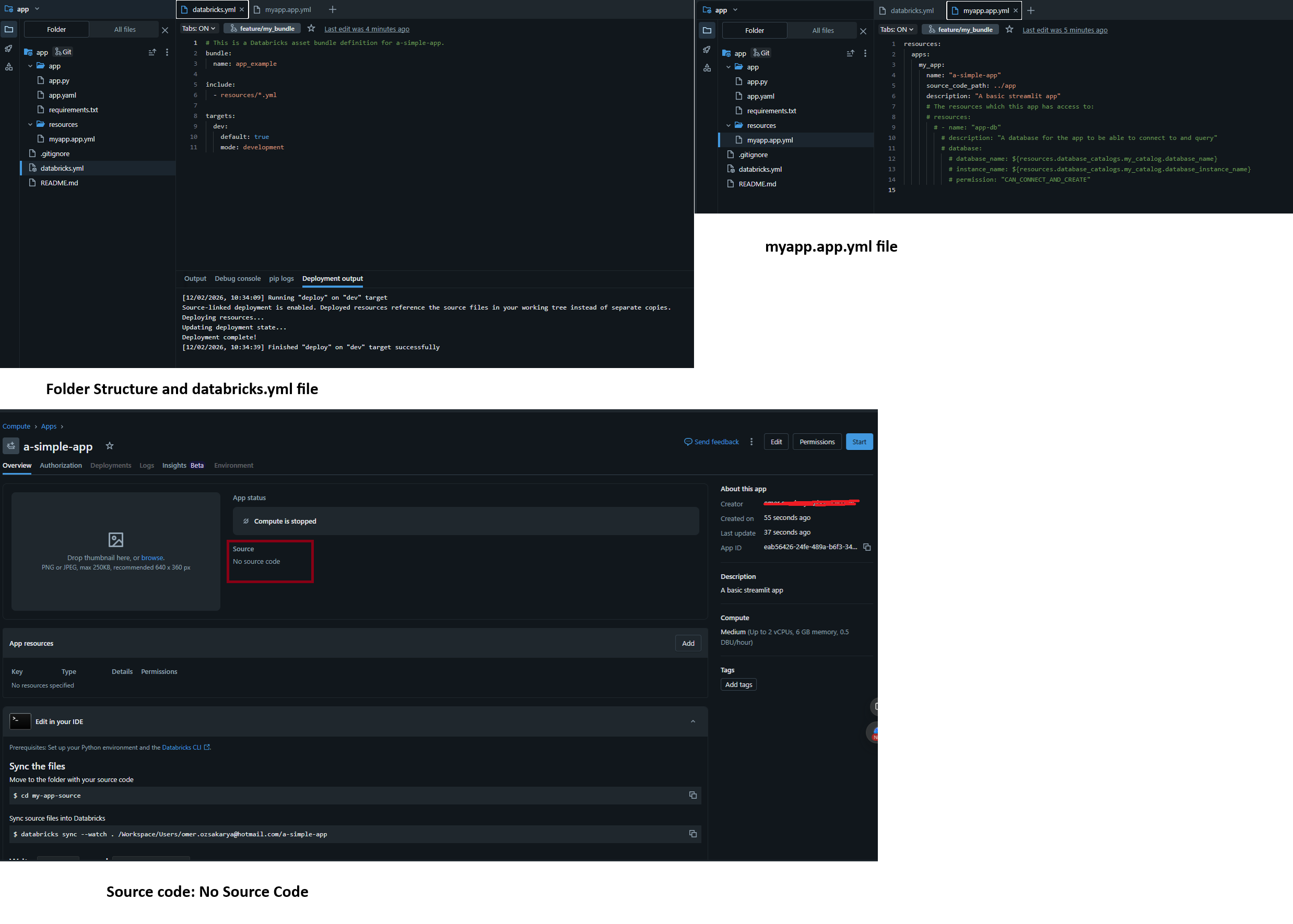
Then, I deployed a streamlit app via Databricks Asset Bundles. Then I opened the related app from Compute/Apps tab. No Source Code is written there.
How can I deploy my streamlit app with source code?
databricks.yml:
# This is a Databricks asset bundle definition for a-simple-app.
bundle:
  name: app_example

include:
  - resources/*.yml

targets:
  dev:
    default: true
    mode: development
myapp.app.yml:
resources:
  apps:
    my_app:
      name: "a-simple-app"
      source_code_path: ../app
      description: "A basic streamlit app"
Compute/Apps page: (No Source Code)


1 ACCEPTED SOLUTION
Accepted Solutions

Options
- Mark as New
- Bookmark
- Subscribe
- Mute
- Subscribe to RSS Feed
- Permalink
- Report Inappropriate Content
02-12-2026 03:03 PM
I looked further - the databricks.yml file is not used in this UI-based workflow - it's only for CLI deployments. Your app configuration therefore comes from selecting options in the UI. I believe that is why the code is never getting deployed here.
The pull from Git cant be automated without CLI access. Apologies for this confusion!!
10 REPLIES 10
Options
- Mark as New
- Bookmark
- Subscribe
- Mute
- Subscribe to RSS Feed
- Permalink
- Report Inappropriate Content
02-12-2026 07:09 AM
Hey @lion_king_84!
If the source code is not appearing, it is likely your Asset Bundle configuration omitted the correct source_code_path or the deployment didn't sync your local files.
Do the deploy logs confirm the upload of source files? Have you completed all 5 steps here?
Let me know -
Sarah

Examples of Databricks Asset Bundles. Contribute to databricks/bundle-examples development by creating an account on GitHub.
Options
- Mark as New
- Bookmark
- Subscribe
- Mute
- Subscribe to RSS Feed
- Permalink
- Report Inappropriate Content
02-12-2026 08:44 AM
Thank you @sarahbhord
I am unable to run the databricks bundle deploy command because I do not have CLI access. Therefore, I am deploying the application directly through the Databricks Workspace UI.
Streamlit app files are successfully deployed into the deployment target:

Streamlit app files are successfully deployed into the deployment target:

I still see No Source Code in the app page. I need to click the Deploy button and then select the path of the source code. I don't want to make it manually. How can I make it via databricks.yml file or Github actions code?

Options
- Mark as New
- Bookmark
- Subscribe
- Mute
- Subscribe to RSS Feed
- Permalink
- Report Inappropriate Content
02-12-2026 12:33 PM
I noticed your databricks.yml uses include: - resources/*.yml, so you need to define the source_code_path in a separate file inside the resources/ folder.
Create resources/app.yml:
resources:
  apps:
    my_app:
      name: "my-streamlit-app"
      source_code_path: ./app  # Path to your app files relative to databricks.yml
Then, adjust the path based on your structure. The path should point to where your app.py and requirements.txt live. Let me know if that does the trick.
- Sarah
Options
- Mark as New
- Bookmark
- Subscribe
- Mute
- Subscribe to RSS Feed
- Permalink
- Report Inappropriate Content
02-12-2026 01:00 PM
In order to make it simpler, I removed include statement and added apps resource into the databricks.yml file.
# This is a Databricks asset bundle definition for a-simple-app.
bundle:
  name: app_example

workspace:
  root_path: /Shared/bundles/snri-bundle

sync:
  paths:
    - app

resources:
  apps:
    my_app:
      name: "my-streamlit-app"
      source_code_path: ./app

targets:
  dev:
    mode: production
    default: true
Deployment output and folder structure:

app was deployed successfully:

still getting No Source Code error message:

Options
- Mark as New
- Bookmark
- Subscribe
- Mute
- Subscribe to RSS Feed
- Permalink
- Report Inappropriate Content
02-12-2026 01:55 PM
Thanks - can you please try removing sync.paths? That way the bundle handles file deployment automatically and ./app should work correctly.
Options
- Mark as New
- Bookmark
- Subscribe
- Mute
- Subscribe to RSS Feed
- Permalink
- Report Inappropriate Content
02-12-2026 02:23 PM
Thank you!
databricks.yml
# This is a Databricks asset bundle definition for a-simple-app.
bundle:
  name: app_example

workspace:
  root_path: /Shared/bundles/snri-bundle

resources:
  apps:
    my_app:
      name: "my-streamlit-app"
      source_code_path: ./app

targets:
  dev:
    mode: production
    default: true
deployment target:

Databricks Compute/Apps:
- still getting No Source Code

Do I need to run a command as below after Databricks Asset Bundle deployment?
databricks apps deploy my-streamlit-app --source-code-path /Workspace/Shared/bundles/snri-bundle/files/app
Options
- Mark as New
- Bookmark
- Subscribe
- Mute
- Subscribe to RSS Feed
- Permalink
- Report Inappropriate Content
02-12-2026 02:54 PM - edited 02-12-2026 02:59 PM
Yes if you have CLI access -databricks bundle deploy creates the app resource, while databricks bundle run my_appdeploys the code and starts it (use my_app - your resource key from databricks.yml, not my-streamlit-app - the app name). Both are required here
Options
- Mark as New
- Bookmark
- Subscribe
- Mute
- Subscribe to RSS Feed
- Permalink
- Report Inappropriate Content
02-12-2026 03:03 PM
I looked further - the databricks.yml file is not used in this UI-based workflow - it's only for CLI deployments. Your app configuration therefore comes from selecting options in the UI. I believe that is why the code is never getting deployed here.
The pull from Git cant be automated without CLI access. Apologies for this confusion!!
Options
- Mark as New
- Bookmark
- Subscribe
- Mute
- Subscribe to RSS Feed
- Permalink
- Report Inappropriate Content
02-14-2026 03:07 AM
Thank you very much.
Did you find this information in the official documentation — specifically the statement that “the databricks.yml file is not used in this UI-based workflow”?
I may need to reference the source documentation to support this point.

Options
- Mark as New
- Bookmark
- Subscribe
- Mute
- Subscribe to RSS Feed
- Permalink
- Report Inappropriate Content
02-16-2026 05:11 AM
Hi @sarahbhord
App deploy as part of asset bundle quite confusing and do not looks logical and finished.
You need to run "databricks bundle deploy", then "databricks apps deploy", then "databricks apps start"
After plain "bundle deploy" you will see "no source code" but only after "databricks apps deploy" you will see some folder either local workspace or dbfs

Announcements



Related Content
- PostgreSQL ingestion source not supported in workspace when deploying Databricks Asset Bundle in Data Engineering
- Automate Lakeflow connect to ingest 300 tables not manually in Data Engineering
- Managing Default Start State for Continuous Streaming Jobs in Databricks Asset Bundles in Data Engineering
- Recommended local development workflow for dashboard CI/CD with environment-specific catalog/schema? in Warehousing & Analytics
- Best practice for creating SQL views on top of continuously running Spark Structured Streaming jobs in Data Engineering