Hi Andy,
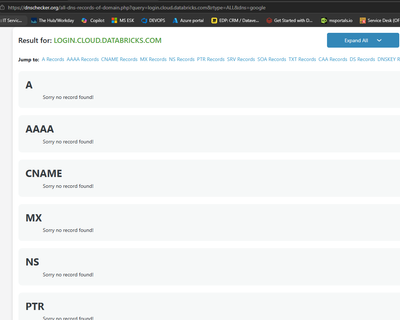
Good detective work here. You checked public DNS before posting, and that screenshot tells most of the story.
As far as I can tell, login.cloud.databricks.com isn't a published Databricks endpoint. The documented login hosts are login.databricks.com for the unified sign-in page, accounts.cloud.databricks.com for the AWS account console, and accounts.azuredatabricks.net on the Azure side. Since the failure happens before any Azure authentication step (the browser never resolves the hostname) and the email plus OTP path works fine, this looks specific to the Azure-login redirect, not a general problem with your training accounts.
To pin down who owns the fix, run these from an affected machine and save the output:
nslookup login.cloud.databricks.com 8.8.8.8nslookup login.cloud.databricks.com 1.1.1.1nslookup login.cloud.databricks.com against your corporate resolvercurl -I https://login.cloud.databricks.com, if your policy allows it
If the public resolvers also come back NXDOMAIN, which matches your dnschecker result, this isn't your network. The redirect behind Continue with Azure appears to point at a hostname with no public DNS record, and only Databricks can fix that. File a ticket with the Training Team at https://help.databricks.com/s/contact-us?ReqType=training and include the hostname, a UTC timestamp, the affected users' Academy emails, the browser, and your DNS results. That evidence should get it routed quickly.
If public DNS resolves the name but your corporate resolver doesn't, then look inward: conditional forwarding, split-horizon DNS, proxy rules, firewall policy, or TLS inspection. Databricks recommends allowing HTTPS and WebSocket traffic to *.cloud.databricks.com: https://docs.databricks.com/aws/en/resources/firewall-rules
Either way, resist the urge to add a manual A record, hosts-file entry, or pinned IP unless Databricks Support hands you an officially documented target. These endpoints and their addresses can change under you.
In the meantime, the email plus OTP login you mentioned is the supported workaround, so your users aren't blocked.
One last bit of context: the AWS, GCP, and Azure buttons on that page are meant for existing Databricks customers signing in with their platform account, per the training team's post here: https://community.databricks.com/t5/training-offerings/accessing-databricks-academy/td-p/83659. Email login doesn't cost your users any course access. It just skips the SSO tie-in.
Short version: gather the DNS evidence, open a training ticket, and let your folks ride the email login until the redirect gets fixed.
Regards, Louis