cancel
Showing results for 
Search instead for 
Did you mean: 
Data Engineering
Join discussions on data engineering best practices, architectures, and optimization strategies within the Databricks Community. Exchange insights and solutions with fellow data engineers.
cancel
Showing results for 
Search instead for 
Did you mean: 

How to stop Databricks adding quotes to multi-line selections

ChrisHunt
New Contributor III

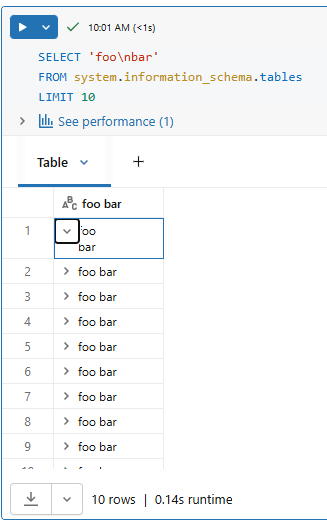
I'm using a query to generate some YML code from my tables, and running into an annoying behaviour. Here's a simplified example...

Run this query in a notebook or the SQL editor:

SELECT 'foo\nbar'
FROM system.information_schema.tables
LIMIT 10

You get a result that looks like this:
foobar.png

Ten rows, each with foo (new line) bar, as expected from my query. Now select those results, copy them and paste them somewhere, you get this:

"foo
bar"
"foo
bar"
"foo
bar"
"foo
bar"
"foo
bar"
"foo
bar"
"foo
bar"
"foo
bar"
"foo
bar"
"foo
bar"

Databricks has "helpfully" added a set of double quotes to each line. I don't want these. If I had wanted them I would have put them in my original query. Is there any way to switch this behaviour off?


2 ACCEPTED SOLUTIONS

Accepted Solutions

Ale_Armillotta
Valued Contributor II

Hi @ChrisHunt .

When a cell value contains a newline, the copy operation wraps it in double quotes (CSV/RFC 4180 style). There's no setting to disable this — it's hardcoded in the UI's copy behavior. This happen only if you have a newline.

View solution in original post

Ashwin_DSA
Databricks Employee
Databricks Employee

Hi @ChrisHunt,

As Ale_Armillotta mentioned, any field that contains a newline is wrapped in double quotes so that each row still represents a single CSV record. I think that is a logical and expected behaviour. There is currently no setting to turn this quoting off.

Your best option is to download as csv and get rid of the double quotes with a script or editor if you really need multi-line fields without surrounding quotes. However, that would mean the line breaks will go away and you'll see them as separate columns when you open the file. 

Before:

   line_break_before.jpg


After:

line_break_after.jpg


Happy to share the script if you are interested but I'm not sure that solves your problem as you may end up having to pivot that data if you want it represented the same way as shown in the Before snapshot.

If this answer resolves your question, could you mark it as “Accept as Solution”? That helps other users quickly find the correct fix.

Regards,
Ashwin | Delivery Solution Architect @ Databricks
Helping you build and scale the Data Intelligence Platform.
***Opinions are my own***

View solution in original post

2 REPLIES 2

Ale_Armillotta
Valued Contributor II

Hi @ChrisHunt .

When a cell value contains a newline, the copy operation wraps it in double quotes (CSV/RFC 4180 style). There's no setting to disable this — it's hardcoded in the UI's copy behavior. This happen only if you have a newline.

Ashwin_DSA
Databricks Employee
Databricks Employee

Hi @ChrisHunt,

As Ale_Armillotta mentioned, any field that contains a newline is wrapped in double quotes so that each row still represents a single CSV record. I think that is a logical and expected behaviour. There is currently no setting to turn this quoting off.

Your best option is to download as csv and get rid of the double quotes with a script or editor if you really need multi-line fields without surrounding quotes. However, that would mean the line breaks will go away and you'll see them as separate columns when you open the file. 

Before:

   line_break_before.jpg


After:

line_break_after.jpg


Happy to share the script if you are interested but I'm not sure that solves your problem as you may end up having to pivot that data if you want it represented the same way as shown in the Before snapshot.

If this answer resolves your question, could you mark it as “Accept as Solution”? That helps other users quickly find the correct fix.

Regards,
Ashwin | Delivery Solution Architect @ Databricks
Helping you build and scale the Data Intelligence Platform.
***Opinions are my own***
