
Turn on suggestions
Auto-suggest helps you quickly narrow down your search results by suggesting possible matches as you type.
Showing results for
Data Engineering
Join discussions on data engineering best practices, architectures, and optimization strategies within the Databricks Community. Exchange insights and solutions with fellow data engineers.
Turn on suggestions
Auto-suggest helps you quickly narrow down your search results by suggesting possible matches as you type.
Showing results for
- Databricks Community
- Data Engineering
- Lakeflow SDP expectations
Options
- Subscribe to RSS Feed
- Mark Topic as New
- Mark Topic as Read
- Float this Topic for Current User
- Bookmark
- Subscribe
- Mute
- Printer Friendly Page

Options
- Mark as New
- Bookmark
- Subscribe
- Mute
- Subscribe to RSS Feed
- Permalink
- Report Inappropriate Content
04-06-2026 11:25 AM
Hi,
Is there a way to get number of warned records, dropped records , failed records for each expectation I see currently it gives aggregated count


1 ACCEPTED SOLUTION
Accepted Solutions

Options
- Mark as New
- Bookmark
- Subscribe
- Mute
- Subscribe to RSS Feed
- Permalink
- Report Inappropriate Content
04-11-2026 02:02 PM
Hi @IM_01,
Warned_records / dropped_records (top-level): These are aggregated per-dataset counts of unique rows that were warned or dropped in that micro-batch/update. They are not a simple sum of failed_records across expectations, because the same row can fail multiple expectations. That row is counted once in warned_records but multiple times in expectations[*].failed_records.
That’s why in your example:
"warned_records": 344,
"expectations": [
  {"name":"valid_case1", ... "failed_records":313},
  {"name":"valid_case2", ... "failed_records":99}
]
344 ≠ 313 + 99 some rows likely violated both valid_case1 and valid_case2.
For fail expectations, the update aborts on the first violation, and data quality metrics are not recorded in the same way as warn/drop. Practically, you do not get meaningful passed_records/failed_records metrics for that expectation in details.flow_progress.data_quality. Instead, you get an expectation violation error event (with the expectation name and offending record) in the event log / error message, but no aggregate counts of how many rows would have failed. So, yes, warned_records is an aggregated, deduped count at the dataset level. No, a FAIL action does not behave like warn/drop in the metrics JSON. you generally won’t see reliable passed_records/failed_records for it, just the failure event.
If this answer resolves your question, could you mark it as “Accept as Solution”? That helps other users quickly find the correct fix.
Regards,
Ashwin | Delivery Solution Architect @ Databricks
Helping you build and scale the Data Intelligence Platform.
***Opinions are my own***
Ashwin | Delivery Solution Architect @ Databricks
Helping you build and scale the Data Intelligence Platform.
***Opinions are my own***
6 REPLIES 6
Options
- Mark as New
- Bookmark
- Subscribe
- Mute
- Subscribe to RSS Feed
- Permalink
- Report Inappropriate Content
04-06-2026 12:05 PM
Hi @IM_01,
You can’t change the UI to break out those numbers, but you can get per-expectation counts from the DLT (Lakeflow) event log. Each expectation entry records passed_records and failed_records; for EXPECT rules failed_records = warned rows, and for EXPECT … DROP ROW rules failed_records = dropped rows. Expectations configured with FAIL UPDATE don’t emit aggregate metrics.
Here is a sample query you can run. Just replace the DLT table name where it says my_dlt_table
WITH exploded AS (
  SELECT
    timestamp,
    explode(
      from_json(
        details:flow_progress:data_quality:expectations,
        'array<struct<name:string,dataset:string,passed_records:long,failed_records:long>>'
      )
    ) AS e
  FROM event_log(TABLE(my_dlt_table))
  WHERE details:flow_progress:data_quality IS NOT NULL
)
SELECT
  timestamp,
  e.name           AS expectation_name,
  e.dataset,
  e.passed_records,
  e.failed_records
FROM exploded
ORDER BY timestamp DESC, expectation_name;
I tested it for a sample table and it returned the split. I'm guessing this is what you want to see?
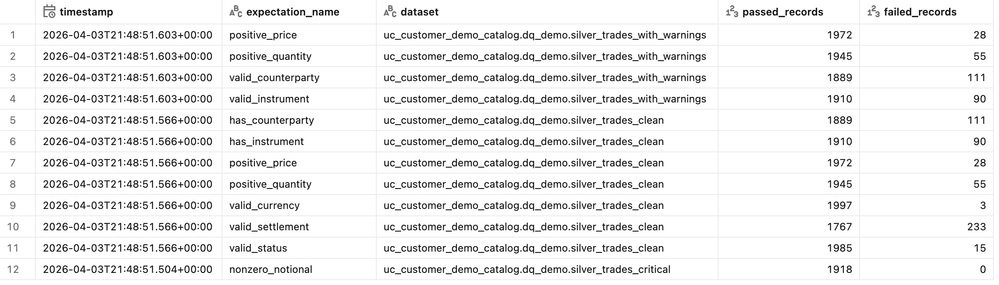
You can also take a look at the documentation here for exploring data quality / expectations metrics from the event log.
Hope this helps.
If this answer resolves your question, could you mark it as “Accept as Solution”? That helps other users quickly find the correct fix.
Regards,
Ashwin | Delivery Solution Architect @ Databricks
Helping you build and scale the Data Intelligence Platform.
***Opinions are my own***
Ashwin | Delivery Solution Architect @ Databricks
Helping you build and scale the Data Intelligence Platform.
***Opinions are my own***
Options
- Mark as New
- Bookmark
- Subscribe
- Mute
- Subscribe to RSS Feed
- Permalink
- Report Inappropriate Content
04-07-2026 12:25 PM
Hi @Ashwin_DSA
Apologies I was referring to event_log in this case
{"dropped_records":0,"warned_records":344,"expectations":[{"name":"valid_case1","dataset":"cat.sch.tb1","passed_records":2505,"failed_records":313},{"name":"valid_case2","dataset":"cat.sch.tb1","passed_records":2719,"failed_records":99}]}
So the warned_records gives aggregated count right and if fail is the action it just gives failed_records in expectations dictionary and no passed records
Options
- Mark as New
- Bookmark
- Subscribe
- Mute
- Subscribe to RSS Feed
- Permalink
- Report Inappropriate Content
04-09-2026 01:44 AM
Hi @Ashwin_DSA
even on passing table name to the event_log function it returns all the rows. could you please help with this
select * from event_log(table(workspace.default.customers_summary_mv))Options
- Mark as New
- Bookmark
- Subscribe
- Mute
- Subscribe to RSS Feed
- Permalink
- Report Inappropriate Content
04-11-2026 02:05 PM
Hi @IM_01,
event_log(TABLE(...)) always returns the entire pipeline’s event log, not just rows for that one dataset. Passing a table is just a shortcut to find the owning pipeline. It doesn’t filter the log to that table.
To restrict to a specific table like customers_summary_mv, add an explicit filter on the flow name (and usually event type). Sample given below.
SELECT *
FROM event_log(TABLE(workspace.default.customers_summary_mv))
WHERE event_type = 'flow_progress'
  AND origin.flow_name = 'customers_summary_mv';
What are you looking for? Expectation metrics for that table?
If this answer resolves your question, could you mark it as “Accept as Solution”? That helps other users quickly find the correct fix.
Regards,
Ashwin | Delivery Solution Architect @ Databricks
Helping you build and scale the Data Intelligence Platform.
***Opinions are my own***
Ashwin | Delivery Solution Architect @ Databricks
Helping you build and scale the Data Intelligence Platform.
***Opinions are my own***
Options
- Mark as New
- Bookmark
- Subscribe
- Mute
- Subscribe to RSS Feed
- Permalink
- Report Inappropriate Content
04-11-2026 02:02 PM
Hi @IM_01,
Warned_records / dropped_records (top-level): These are aggregated per-dataset counts of unique rows that were warned or dropped in that micro-batch/update. They are not a simple sum of failed_records across expectations, because the same row can fail multiple expectations. That row is counted once in warned_records but multiple times in expectations[*].failed_records.
That’s why in your example:
"warned_records": 344,
"expectations": [
  {"name":"valid_case1", ... "failed_records":313},
  {"name":"valid_case2", ... "failed_records":99}
]
344 ≠ 313 + 99 some rows likely violated both valid_case1 and valid_case2.
For fail expectations, the update aborts on the first violation, and data quality metrics are not recorded in the same way as warn/drop. Practically, you do not get meaningful passed_records/failed_records metrics for that expectation in details.flow_progress.data_quality. Instead, you get an expectation violation error event (with the expectation name and offending record) in the event log / error message, but no aggregate counts of how many rows would have failed. So, yes, warned_records is an aggregated, deduped count at the dataset level. No, a FAIL action does not behave like warn/drop in the metrics JSON. you generally won’t see reliable passed_records/failed_records for it, just the failure event.
If this answer resolves your question, could you mark it as “Accept as Solution”? That helps other users quickly find the correct fix.
Regards,
Ashwin | Delivery Solution Architect @ Databricks
Helping you build and scale the Data Intelligence Platform.
***Opinions are my own***
Ashwin | Delivery Solution Architect @ Databricks
Helping you build and scale the Data Intelligence Platform.
***Opinions are my own***
Options
- Mark as New
- Bookmark
- Subscribe
- Mute
- Subscribe to RSS Feed
- Permalink
- Report Inappropriate Content
04-12-2026 11:43 AM
Thanks Ashwin

Announcements


Related Content
- Lakeflow Connect SQL Server (integrated CDC pipeline): no way to Include/exclude columns in Data Engineering
- Beyond Bronze, Silver, and Gold: When Does a Separate Stage Make Sense? in Data Engineering
- Propagating SCD2 History from Silver to Gold with AUTO CDC FLOW and Handling Full Refresh in Data Engineering
- How to Unit Test Spark Declarative Pipelines in Data Engineering
- HubSpot connector in Data Engineering