
Turn on suggestions
Auto-suggest helps you quickly narrow down your search results by suggesting possible matches as you type.
Showing results for
Data Engineering
Join discussions on data engineering best practices, architectures, and optimization strategies within the Databricks Community. Exchange insights and solutions with fellow data engineers.
Turn on suggestions
Auto-suggest helps you quickly narrow down your search results by suggesting possible matches as you type.
Showing results for
- Databricks Community
- Data Engineering
- Re: Rendering HTML in ipywidgets output
Options
- Subscribe to RSS Feed
- Mark Topic as New
- Mark Topic as Read
- Float this Topic for Current User
- Bookmark
- Subscribe
- Mute
- Printer Friendly Page

Options
- Mark as New
- Bookmark
- Subscribe
- Mute
- Subscribe to RSS Feed
- Permalink
- Report Inappropriate Content
05-27-2026 09:04 PM
Hi, I am experimenting with IPywidgets on Databricks (company Azure account and Free Edition).
I have an HTML that I would like to render so typically what happens is that simple things like:
import ipywidgets as widgets

output = widgets.Output()

with output:
    displayHTML(
        """
<h1>This is heading 1</h1>
<h2>This is heading 2</h2>
<h3>This is heading 3</h3>
"""
    )

output
Work flawlessly. I have a more complex one, that works fine with:
with open('testme.html', encoding='utf8') as f:
        some_html = f.read()
displayHTML(some_html)
But If I do like the above
output = widgets.Output()

with output:
    displayHTML(some_html)

output
It does not work. It gives a message of
"Latest error: Uncaught ReferenceError: Tabulator is not defined"
Tabulator is the JS library I use in HTML.. Here is the said HTML
https://drive.google.com/file/d/1LXqhEDFA5LwRqrhWXGJntitPqv66lCza/view?usp=sharing
My use case is to use IPywidgets controls to change the HTML to be rendered. The code works fine in Jupyterlab and VScodium notebook.


1 ACCEPTED SOLUTION
Accepted Solutions

Options
- Mark as New
- Bookmark
- Subscribe
- Mute
- Subscribe to RSS Feed
- Permalink
- Report Inappropriate Content
05-28-2026 02:51 AM
Hi @vvanag,
What you’re seeing is expected to some extent in Databricks Notebooks.
Databricks supports ipywidgets, but it doesn’t guarantee full Jupyter or Colab parity, and there are a few documented limitations on how widgets render and behave in notebooks.
In particular, Databricks notes that some ipywidgets are not supported, widget state is not preserved across notebook sessions, and some widgets or widget outputs may not render correctly in all cases. The docs also specifically note that widgets might not render correctly in dark mode, especially coloured widgets.
A practical workaround is to avoid routing rich HTML through widgets.Output() and instead render the HTML directly in the notebook using Databricks-native HTML rendering, for example, with displayHTML(...). That works better in Databricks when the main goal is to show HTML rather than keep it inside a widget output container.
Here is an example.
%python
import ipywidgets as widgets
from IPython.display import display

btn = widgets.Button(description="Render HTML")

def on_click(_):
    displayHTML(some_html)

btn.on_click(on_click)
display(btn)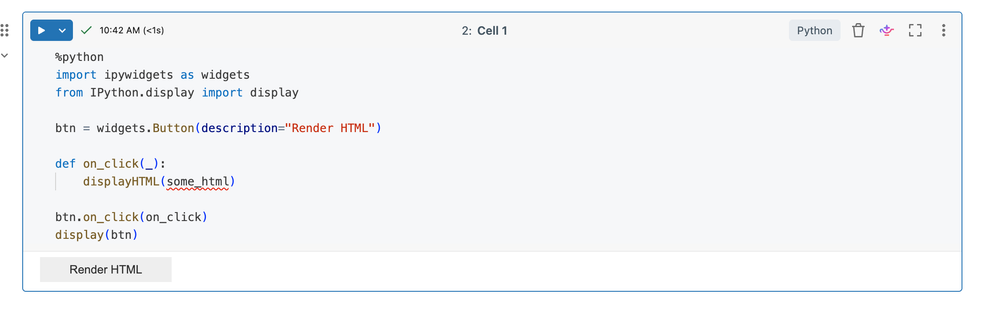
The public docs here are the best references: Databricks ipywidgets documentation and Known limitations of Databricks notebooks.
Also curious to know if you are using this on serverless or a cluster-backed notebook? Are you using dark mode?Which Databricks Runtime version are you on? Databricks also notes that some ipywidgets do not work in Databricks Runtime 15.0. Lastly, which browser are you testing in? All of these are called out in the limitations and could be causing this.
Hope this helps.
If this answer resolves your question, could you mark it as “Accept as Solution”? That helps other users quickly find the correct fix.
Regards,
Ashwin | Delivery Solution Architect @ Databricks
Helping you build and scale the Data Intelligence Platform.
***Opinions are my own***
Ashwin | Delivery Solution Architect @ Databricks
Helping you build and scale the Data Intelligence Platform.
***Opinions are my own***
5 REPLIES 5
Options
- Mark as New
- Bookmark
- Subscribe
- Mute
- Subscribe to RSS Feed
- Permalink
- Report Inappropriate Content
05-28-2026 02:51 AM
Hi @vvanag,
What you’re seeing is expected to some extent in Databricks Notebooks.
Databricks supports ipywidgets, but it doesn’t guarantee full Jupyter or Colab parity, and there are a few documented limitations on how widgets render and behave in notebooks.
In particular, Databricks notes that some ipywidgets are not supported, widget state is not preserved across notebook sessions, and some widgets or widget outputs may not render correctly in all cases. The docs also specifically note that widgets might not render correctly in dark mode, especially coloured widgets.
A practical workaround is to avoid routing rich HTML through widgets.Output() and instead render the HTML directly in the notebook using Databricks-native HTML rendering, for example, with displayHTML(...). That works better in Databricks when the main goal is to show HTML rather than keep it inside a widget output container.
Here is an example.
%python
import ipywidgets as widgets
from IPython.display import display

btn = widgets.Button(description="Render HTML")

def on_click(_):
    displayHTML(some_html)

btn.on_click(on_click)
display(btn)
The public docs here are the best references: Databricks ipywidgets documentation and Known limitations of Databricks notebooks.
Also curious to know if you are using this on serverless or a cluster-backed notebook? Are you using dark mode?Which Databricks Runtime version are you on? Databricks also notes that some ipywidgets do not work in Databricks Runtime 15.0. Lastly, which browser are you testing in? All of these are called out in the limitations and could be causing this.
Hope this helps.
If this answer resolves your question, could you mark it as “Accept as Solution”? That helps other users quickly find the correct fix.
Regards,
Ashwin | Delivery Solution Architect @ Databricks
Helping you build and scale the Data Intelligence Platform.
***Opinions are my own***
Ashwin | Delivery Solution Architect @ Databricks
Helping you build and scale the Data Intelligence Platform.
***Opinions are my own***
Options
- Mark as New
- Bookmark
- Subscribe
- Mute
- Subscribe to RSS Feed
- Permalink
- Report Inappropriate Content
05-28-2026 03:19 AM
Unfortunately even this one does not work
%python
import ipywidgets as widgets
from IPython.display import display

btn = widgets.Button(description="Render HTML")

def on_click(_):
    displayHTML("OK <b>docy</b>")

btn.on_click(on_click)
display(btn)
However this one is fine
displayHTML("OK <b>docy</b>")Options
- Mark as New
- Bookmark
- Subscribe
- Mute
- Subscribe to RSS Feed
- Permalink
- Report Inappropriate Content
05-28-2026 03:53 AM
Hi @vvanag,
When you say it doesn't work, do you see an error message? Can you also provide more details about the cluster, runtime, browser, and whether you are using dark or light mode? This will help narrow down the problem. Please attach snapshots as well.
If this answer resolves your question, could you mark it as “Accept as Solution”? That helps other users quickly find the correct fix.
Regards,
Ashwin | Delivery Solution Architect @ Databricks
Helping you build and scale the Data Intelligence Platform.
***Opinions are my own***
Ashwin | Delivery Solution Architect @ Databricks
Helping you build and scale the Data Intelligence Platform.
***Opinions are my own***
Options
- Mark as New
- Bookmark
- Subscribe
- Mute
- Subscribe to RSS Feed
- Permalink
- Report Inappropriate Content
05-28-2026 04:48 AM
I use the Free Databricks version to run the above two snippets

I clicked the button and nothing appears. Not even an error message, see above.
here is my notebook
https://dbc-32e2a8b7-339b.cloud.databricks.com/editor/notebooks/242832157166410?o=163957098038127
I use Chromium on Windows 11 x64
Version 148.0.7778.179 (Official Build) (64-bit)
Waterfox has the same problem.
Options
- Mark as New
- Bookmark
- Subscribe
- Mute
- Subscribe to RSS Feed
- Permalink
- Report Inappropriate Content
05-28-2026 05:52 AM
Hi @vvanag,
Got it. Thanks for the additional info.
Try this..
import ipywidgets as widgets
from IPython.display import display

btn = widgets.Button(description="Render HTML")
html = widgets.HTML()

def on_click(_):
    html.value = "OK <b>docs</b>"

btn.on_click(on_click)
display(widgets.VBox([btn, html]))
This avoids mixing Databricks notebook rendering with widget callback output, which is the part most likely failing here. Should initially show Render HTML button when you execute the cell. When you click that, it should show what you are after. This is from my free edition account.

Hope this helps.
If this answer resolves your question, could you mark it as “Accept as Solution”? That helps other users quickly find the correct fix.
Regards,
Ashwin | Delivery Solution Architect @ Databricks
Helping you build and scale the Data Intelligence Platform.
***Opinions are my own***
Ashwin | Delivery Solution Architect @ Databricks
Helping you build and scale the Data Intelligence Platform.
***Opinions are my own***

Announcements


Related Content
- Problem rendering HTML in IPywidgets in Warehousing & Analytics
- Rendering HTML in ipywidgets output in Data Engineering
- Problem with ipywidgets and plotly on Databricks in Machine Learning
- Plotly error while plotting into ipywidget output on Databricks in Data Engineering
- Best way to make a scrollable DataFrame in a ipywidgets.Output? in Data Engineering