
Turn on suggestions
Auto-suggest helps you quickly narrow down your search results by suggesting possible matches as you type.
Showing results for
Data Engineering
Join discussions on data engineering best practices, architectures, and optimization strategies within the Databricks Community. Exchange insights and solutions with fellow data engineers.
Turn on suggestions
Auto-suggest helps you quickly narrow down your search results by suggesting possible matches as you type.
Showing results for
- Databricks Community
- Data Engineering
- Re: Unable to retrieve catalog, schema, tables usi...
Options
- Subscribe to RSS Feed
- Mark Topic as New
- Mark Topic as Read
- Float this Topic for Current User
- Bookmark
- Subscribe
- Mute
- Printer Friendly Page

Options
- Mark as New
- Bookmark
- Subscribe
- Mute
- Subscribe to RSS Feed
- Permalink
- Report Inappropriate Content
12-03-2025 06:12 AM
Hi,
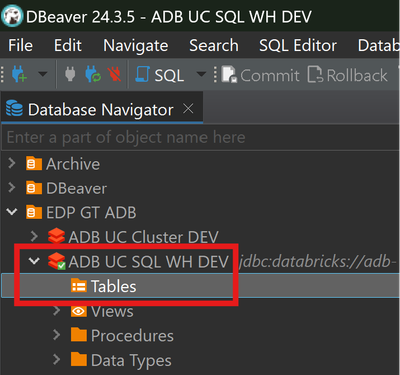
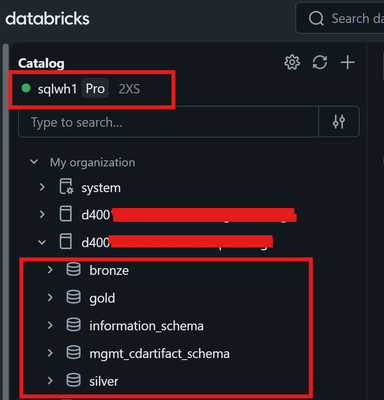
I am connecting to SQL Warehouse in UC using its JDBC endpoint via DBeaver. However, it doesn't list any catalogs, schemas and tables. I checked the permission of SQL WH by logging to ADB Workspace and queried the table (attached a dummy table example) using Warehouse compute.
Since its unity catalog, so I tried same with All Purpose Cluster. With APC, I am able to see tables via ADB workspace as well as DBeaver.
Can someone please guide what's preventing access of Unity Catalog through JDBC endpoint of SQL WH using DBeaver?

#warehouse #jdbc #dbeaver
Labels:
- Labels:
-
Delta Lake


1 ACCEPTED SOLUTION
Accepted Solutions
Options
- Mark as New
- Bookmark
- Subscribe
- Mute
- Subscribe to RSS Feed
- Permalink
- Report Inappropriate Content
01-27-2026 09:49 AM
Hi @Commitchell ,
Thanks for trying out DBeaver connection at your end. Yes, the OAuth is successful and I'm setting same driver properties as you.
Today, I got the issue resolved by updating the driver. At the time of posting my question, I was using JDBC driver 2.7 but today I updated to 3.1.1 and tried with 3.0.7 as well. Both driver are able to list catalogs, schemas and tables to some extent.
I ran into another issue in which I am unable to list all schemas inside catalogs which are having long names(d4001-centralus-azcld-mgmtcatalog - Catalog naming is enforced by organization so can't make it short). As a workaround, I am using below query to list all schemas and tables inside catalogs.


select * from system.information_schema.tablesI don't think I can use UI to browse through long catalog names.
5 REPLIES 5

Options
- Mark as New
- Bookmark
- Subscribe
- Mute
- Subscribe to RSS Feed
- Permalink
- Report Inappropriate Content
12-04-2025 07:50 AM
Hi there,
I'm not familiar with DBeaver specifically, but I have experienced DBSQL Warehouses being much stricter when enforcing permissions than All-Purpose Clusters. Warehouses check explicitly if that identity has access to those assets, where All-Purpose Clusters may have several different configurations that makes them appear more permissive. You cannot rely on admin permissions when using a warehouse either.
I know it sounds silly as you can literally see the tables using the warehouse in the Databricks GUI, but I'd still double check that your user, or the service principal you are using for the JDBC connection, has the following permissions on the Catalog/Schemas that you wish to see:
GRANT USE CATALOG ON CATALOG <catalog> TO <principal>;
GRANT USE SCHEMA  ON SCHEMA  <catalog>.<schema> TO <principal>;
Let us know if you figure it out!
Options
- Mark as New
- Bookmark
- Subscribe
- Mute
- Subscribe to RSS Feed
- Permalink
- Report Inappropriate Content
01-27-2026 04:51 AM
Hi @Commitchell ,
I have checked the necessary permissions and I do have the necessary permissions. Still, I have been unable to see any schema, tables in DBeaver for my UC ADB while using Browser Based Interactive Login (Entra ID).
Just to validate that using my local machine is not preventing me to access data from Unity Catalog (due to org policy), I was able to fetch and retrieve table using Databricks SQL Connector for Python but unfortunately that can't be used as alternative to DBeaver. The issue still persists.
Options
- Mark as New
- Bookmark
- Subscribe
- Mute
- Subscribe to RSS Feed
- Permalink
- Report Inappropriate Content
01-27-2026 06:35 AM
Out of curiosity, how are you using DBeaver (or what are you using it for)? Perhaps I can recommend a native alternative within Databricks.
I just downloaded DBeaver and configured the JDBC connection to DBSQL via Browser OAuth. I was able to successfully connect to a catalog, schema, and browse tables.
Looking at your screenshots, I notice that it's not just the Tables that are empty, your Catalog and Schemas aren't populating either. Here's mine with the 3-level hierarchy showing:

This would indicate a permissions issue with the Catalog.

Silly question, I assume you tested the connection and the OAuth succeeded?
I did have to set the driver properties to get my OAuth Flow to work:
AuthMech = 11
EnableTokenCache = 0


Options
- Mark as New
- Bookmark
- Subscribe
- Mute
- Subscribe to RSS Feed
- Permalink
- Report Inappropriate Content
01-27-2026 09:49 AM
Hi @Commitchell ,
Thanks for trying out DBeaver connection at your end. Yes, the OAuth is successful and I'm setting same driver properties as you.
Today, I got the issue resolved by updating the driver. At the time of posting my question, I was using JDBC driver 2.7 but today I updated to 3.1.1 and tried with 3.0.7 as well. Both driver are able to list catalogs, schemas and tables to some extent.
I ran into another issue in which I am unable to list all schemas inside catalogs which are having long names(d4001-centralus-azcld-mgmtcatalog - Catalog naming is enforced by organization so can't make it short). As a workaround, I am using below query to list all schemas and tables inside catalogs.
select * from system.information_schema.tablesI don't think I can use UI to browse through long catalog names.
Options
- Mark as New
- Bookmark
- Subscribe
- Mute
- Subscribe to RSS Feed
- Permalink
- Report Inappropriate Content
01-28-2026 07:03 AM
Strange! That sounds like it might be a DBeaver limitation. I'm glad you got it working and found a workaround!

Announcements


Related Content
- Unity Catalog Lineage APIs – Are these REST APIs publicly supported? in Data Governance
- Billing structure and LLM usage costs for no-code agents in Generative AI
- Cross-region S3 reads fail with 400 Bad Request on Serverless in Administration & Architecture
- Databricks SQL connection becomes stale in long-running app in Data Engineering
- Databricks excel plugin error in Warehousing & Analytics