Hi
@BigAlThePal,
As
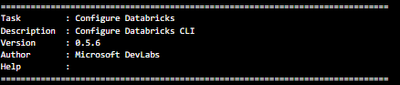
@szymon_dybczak mentioned, the "DevOps for Azure Databricks" extension by Microsoft DevLabs (which provided the "Configure Databricks CLI" and "Deploy Notebooks to Workspace" tasks) was deprecated and has since been removed from the Azure DevOps Marketplace. The last commit to its source repository (
https://github.com/microsoft/azdo-databricks) was several years ago.
The recommended path forward is to replace those tasks with direct Databricks CLI calls or, even better, adopt Databricks Asset Bundles (DAB). Here are two approaches, starting with the most recommended.
OPTION 1: DATABRICKS ASSET BUNDLES (RECOMMENDED)
Databricks Asset Bundles are the officially recommended approach for CI/CD on Databricks. Bundles let you define jobs, pipelines, notebooks, and other workspace resources as version-controlled source files in a databricks.yml configuration, then deploy everything with a single CLI command.
Step 1: Install the Databricks CLI in your Azure DevOps pipeline. In your azure-pipelines.yml, add a script step:
- script: |
curl -fsSL
https://raw.githubusercontent.com/databricks/setup-cli/main/install.sh | sh
displayName: 'Install Databricks CLI'
Step 2: Authenticate. You can use a service principal with OAuth (client credentials) or a personal access token. For a service principal, set pipeline variables for DATABRICKS_HOST, DATABRICKS_CLIENT_ID, and DATABRICKS_CLIENT_SECRET, then export them:
- script: |
export DATABRICKS_HOST=$(DATABRICKS_HOST)
export DATABRICKS_CLIENT_ID=$(DATABRICKS_CLIENT_ID)
export DATABRICKS_CLIENT_SECRET=$(DATABRICKS_CLIENT_SECRET)
databricks bundle validate -t production
databricks bundle deploy -t production
displayName: 'Deploy Databricks Bundle'
Step 3: Initialize a bundle in your repo if you do not already have one. From your local machine, run:
databricks bundle init
This creates a databricks.yml and supporting files. Define your notebooks, jobs, and other resources in that configuration. The bundle deploy command handles uploading notebooks, creating/updating jobs, and configuring everything in one step, which replaces both of your old tasks.
For full details on bundle configuration, see:
https://docs.databricks.com/en/dev-tools/bundles/index.htmlOPTION 2: DATABRICKS CLI DIRECTLY (QUICK MIGRATION)
If you want a faster migration without restructuring your project into a bundle, you can replicate the old tasks using raw Databricks CLI commands in script steps.
Replace "Configure Databricks CLI":
- script: |
curl -fsSL
https://raw.githubusercontent.com/databricks/setup-cli/main/install.sh | sh
export DATABRICKS_HOST=$(DATABRICKS_HOST)
export DATABRICKS_TOKEN=$(DATABRICKS_TOKEN)
databricks auth env
displayName: 'Install and Configure Databricks CLI'
Replace "Deploy Notebooks to Workspace":
- script: |
export DATABRICKS_HOST=$(DATABRICKS_HOST)
export DATABRICKS_TOKEN=$(DATABRICKS_TOKEN)
databricks workspace import-dir ./notebooks /Workspace/Shared/my-project --overwrite
displayName: 'Deploy Notebooks to Workspace'
The "workspace import-dir" command recursively uploads all notebooks from a local directory to the specified workspace path, which is the same thing the old extension task did.
For CLI installation details:
https://docs.databricks.com/en/dev-tools/cli/install.htmlFor authentication options (tokens, OAuth, service principals):
https://docs.databricks.com/en/dev-tools/cli/authentication.htmlAUTHENTICATION NOTE
For production CD pipelines, using a service principal with OAuth client credentials is more secure than personal access tokens. You can register a service principal in your Azure Databricks account, generate an OAuth secret, and store the client ID and secret as Azure DevOps secret variables. This avoids tying deployments to an individual user account.
Documentation on service principal authentication:
https://docs.databricks.com/en/dev-tools/authentication-oauth.htmlSUMMARY
The old extension is no longer available, but the replacement approach using the Databricks CLI (either standalone or through Asset Bundles) gives you more flexibility and is actively maintained. Asset Bundles in particular let you manage not just notebook deployments but also jobs, pipelines, permissions, and cluster configurations all as code.
* This reply used an agent system I built to research and draft this response based on the wide set of documentation I have available and previous memory. I personally review the draft for any obvious issues and for monitoring system reliability and update it when I detect any drift, but there is still a small chance that something is inaccurate, especially if you are experimenting with brand new features.
If this answer resolves your question, could you mark it as "Accept as Solution"? That helps other users quickly find the correct fix.